


Page 57 - Adobe Photoshop CC 2020
P. 57
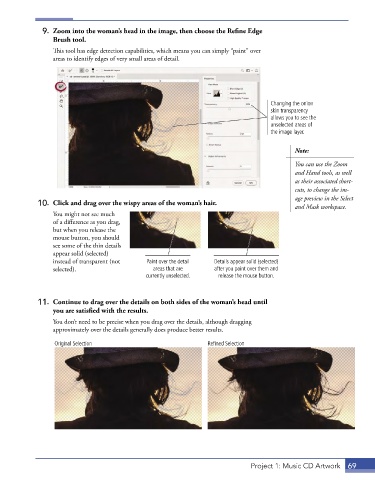
9.  Zoom into the woman’s head in the image, then choose the Refine Edge
                 Brush tool.
                 This tool has edge detection capabilities, which means you can simply “paint” over
                 areas to identify edges of very small areas of detail.


                                                                                    Changing the onion
                                                                                    skin transparency
                                                                                    allows you to see the
                                                                                    unselected areas of
                                                                                    the image layer.


                                                                                           Note:
                                                                                           You can use the Zoom
                                                                                           and Hand tools, as well
                                                                                           as their associated short-
                                                                                           cuts, to change the im-
                                                                                           age preview in the Select
             10.  Click and drag over the wispy areas of the woman’s hair.
                                                                                           and Mask workspace.
                 You might not see much
                 of a difference as you drag,
                 but when you release the
                 mouse button, you should
                 see some of the thin details
                 appear solid (selected)
                 instead of transparent (not   Paint over the detail   Details appear solid (selected)
                 selected).                     areas that are    after you paint over them and
                                              currently unselected.  release the mouse button.


             11.  Continue to drag over the details on both sides of the woman’s head until
                 you are satisfied with the results.
                 You don’t need to be precise when you drag over the details, although dragging
                 approximately over the details generally does produce better results.

                  Original Selection                            Refined Selection


                                                                              Project 1: Music CD Artwork  69

