


Page 26 - Adobe Photoshop CC 2020
P. 26
The Crop Tools in Depth (continued)

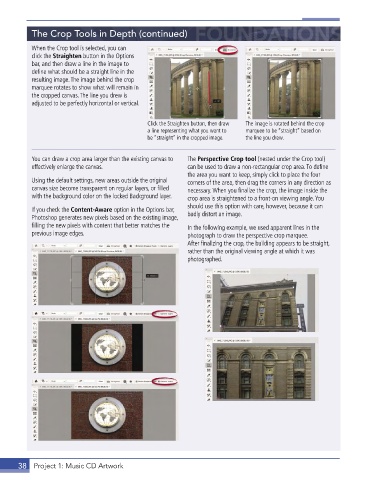
           When the Crop tool is selected, you can
           click the Straighten button in the Options
           bar, and then draw a line in the image to
           define what should be a straight line in the
           resulting image . The image behind the crop
           marquee rotates to show what will remain in
           the cropped canvas . The line you drew is
           adjusted to be perfectly horizontal or vertical .


                                              Click the Straighten button, then draw   The image is rotated behind the crop
                                              a line representing what you want to   marquee to be “straight” based on
                                              be “straight” in the cropped image.  the line you drew.


           You can draw a crop area larger than the existing canvas to   The Perspective Crop tool (nested under the Crop tool)
           effectively enlarge the canvas .               can be used to draw a non-rectangular crop area . To define
                                                          the area you want to keep, simply click to place the four
           Using the default settings, new areas outside the original   corners of the area, then drag the corners in any direction as
           canvas size become transparent on regular layers, or filled   necessary . When you finalize the crop, the image inside the
           with the background color on the locked Background layer .  crop area is straightened to a front-on viewing angle . You
                                                          should use this option with care, however, because it can
           If you check the Content-Aware option in the Options bar,   badly distort an image .
           Photoshop generates new pixels based on the existing image,
           filling the new pixels with content that better matches the   In the following example, we used apparent lines in the
           previous image edges .                         photograph to draw the perspective crop marquee .
                                                          After finalizing the crop, the building appears to be straight,
                                                          rather than the original viewing angle at which it was
                                                          photographed .


       38  Project 1: Music CD Artwork

