


Page 19 - Adobe Photoshop CC 2020
P. 19
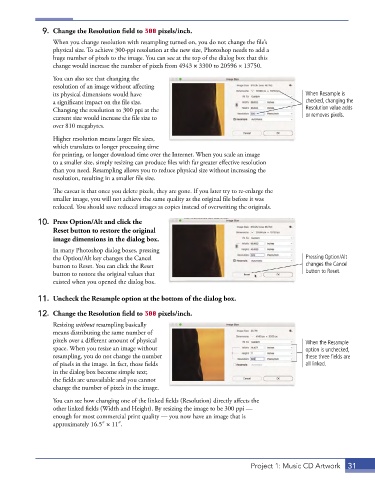
9.  Change the Resolution field to 300 pixels/inch.
                 When you change resolution with resampling turned on, you do not change the file’s
                 physical size. To achieve 300-ppi resolution at the new size, Photoshop needs to add a
                 huge number of pixels to the image. You can see at the top of the dialog box that this
                 change would increase the number of pixels from 4943 × 3300 to 20596 × 13750.
                 You can also see that changing the
                 resolution of an image without affecting
                 its physical dimensions would have                                           When Resample is
                 a significant impact on the file size.                                       checked, changing the
                 Changing the resolution to 300 ppi at the                                    Resolution value adds
                 current size would increase the file size to                                 or removes pixels.
                 over 810 megabytes.

                 Higher resolution means larger file sizes,
                 which translates to longer processing time
                 for printing, or longer download time over the Internet. When you scale an image
                 to a smaller size, simply resizing can produce files with far greater effective resolution
                 than you need. Resampling allows you to reduce physical size without increasing the
                 resolution, resulting in a smaller file size.

                 The caveat is that once you delete pixels, they are gone. If you later try to re-enlarge the
                 smaller image, you will not achieve the same quality as the original file before it was
                 reduced. You should save reduced images as copies instead of overwriting the originals.
             10.  Press Option/Alt and click the
                 Reset button to restore the original
                 image dimensions in the dialog box.
                 In many Photoshop dialog boxes, pressing
                 the Option/Alt key changes the Cancel                                        Pressing Option/Alt
                 button to Reset. You can click the Reset                                     changes the Cancel
                 button to restore the original values that                                   button to Reset.
                 existed when you opened the dialog box.

             11.  Uncheck the Resample option at the bottom of the dialog box.

             12.  Change the Resolution field to 300 pixels/inch.
                 Resizing without resampling basically
                 means distributing the same number of
                 pixels over a different amount of physical                                   When the Resample
                 space. When you resize an image without                                      option is unchecked,
                 resampling, you do not change the number                                     these three fields are
                 of pixels in the image. In fact, those fields                                all linked.
                 in the dialog box become simple text;
                 the fields are unavailable and you cannot
                 change the number of pixels in the image.

                 You can see how changing one of the linked fields (Resolution) directly affects the
                 other linked fields (Width and Height). By resizing the image to be 300 ppi —
                 enough for most commercial print quality — you now have an image that is
                 approximately 16.5″ × 11″.


                                                                              Project 1: Music CD Artwork  31

