


Page 16 - Adobe Photoshop CC 2020
P. 16
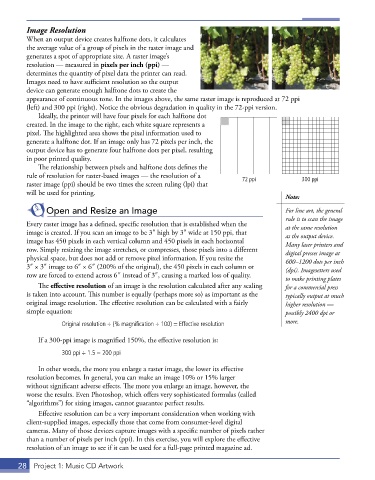
Image Resolution
         When an output device creates halftone dots, it calculates
         the average value of a group of pixels in the raster image and
         generates a spot of appropriate size. A raster image’s
         resolution — measured in pixels per inch (ppi) —
         determines the quantity of pixel data the printer can read.
         Images need to have sufficient resolution so the output
         device can generate enough halftone dots to create the
         appearance of continuous tone. In the images above, the same raster image is reproduced at 72 ppi
         (left) and 300 ppi (right). Notice the obvious degradation in quality in the 72-ppi version.
             Ideally, the printer will have four pixels for each halftone dot
         created. In the image to the right, each white square represents a
         pixel. The highlighted area shows the pixel information used to
         generate a halftone dot. If an image only has 72 pixels per inch, the
         output device has to generate four halftone dots per pixel, resulting
         in poor printed quality.
             The relationship between pixels and halftone dots defines the
         rule of resolution for raster-based images — the resolution of a   72 ppi           300 ppi
         raster image (ppi) should be two times the screen ruling (lpi) that
         will be used for printing.
                                                                                        Note:
               Open and Resize an Image                                                 For line art, the general
                                                                                        rule is to scan the image
         Every raster image has a defined, specific resolution that is established when the   at the same resolution
         image is created. If you scan an image to be 3″ high by 3″ wide at 150 ppi, that   as the output device.
         image has 450 pixels in each vertical column and 450 pixels in each horizontal   Many laser printers and
         row. Simply resizing the image stretches, or compresses, those pixels into a different   digital presses image at
         physical space, but does not add or remove pixel information. If you resize the   600–1200 dots per inch
         3″ × 3″ image to 6″ × 6″ (200% of the original), the 450 pixels in each column or   (dpi). Imagesetters used
         row are forced to extend across 6″ instead of 3″, causing a marked loss of quality.  to make printing plates
             The effective resolution of an image is the resolution calculated after any scaling   for a commercial press
         is taken into account. This number is equally (perhaps more so) as important as the   typically output at much
         original image resolution. The effective resolution can be calculated with a fairly   higher resolution —
         simple equation:                                                               possibly 2400 dpi or

                    Original resolution ÷ (% magnification ÷ 100) = Effective resolution  more.

             If a 300-ppi image is magnified 150%, the effective resolution is:
                    300 ppi ÷ 1 .5 = 200 ppi

             In other words, the more you enlarge a raster image, the lower its effective
         resolution becomes. In general, you can make an image 10% or 15% larger
         without significant adverse effects. The more you enlarge an image, however, the
         worse the results. Even Photoshop, which offers very sophisticated formulas (called
         “algorithms”) for sizing images, cannot guarantee perfect results.
             Effective resolution can be a very important consideration when working with
         client-supplied images, especially those that come from consumer-level digital
         cameras. Many of those devices capture images with a specific number of pixels rather
         than a number of pixels per inch (ppi). In this exercise, you will explore the effective
         resolution of an image to see if it can be used for a full-page printed magazine ad.


       28  Project 1: Music CD Artwork

