


Page 18 - Adobe Photoshop CC 2020
P. 18
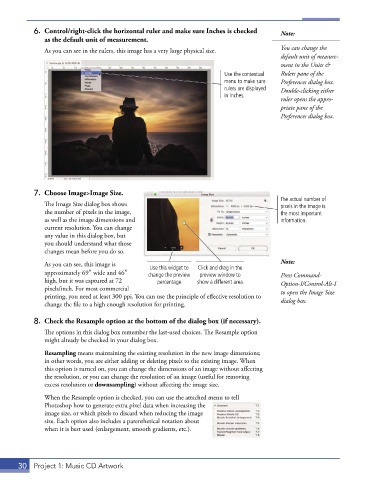
6.  Control/right-click the horizontal ruler and make sure Inches is checked   Note:
               as the default unit of measurement.
               As you can see in the rulers, this image has a very large physical size.   You can change the
                                                                                       default unit of measure-
                                                                                       ment in the Units &
                                                                      Use the contextual   Rulers pane of the
                                                                      menu to make sure   Preferences dialog box.
                                                                      rulers are displayed   Double-clicking either
                                                                      in Inches.
                                                                                       ruler opens the appro-
                                                                                       priate pane of the
                                                                                       Preferences dialog box.


           7.  Choose Image>Image Size.
                                                                                       The actual number of
               The Image Size dialog box shows                                         pixels in the image is
               the number of pixels in the image,                                      the most important
               as well as the image dimensions and                                     information.
               current resolution. You can change
               any value in this dialog box, but
               you should understand what those
               changes mean before you do so.

               As you can see, this image is   Use this widget to   Click and drag in the   Note:
               approximately 69″ wide and 46″   change the preview   preview window to   Press Command-
               high, but it was captured at 72   percentage.  show a different area.   Option-I/Control-Alt-I
               pixels/inch. For most commercial                                        to open the Image Size
               printing, you need at least 300 ppi. You can use the principle of effective resolution to   dialog box.
               change the file to a high enough resolution for printing.

           8.  Check the Resample option at the bottom of the dialog box (if necessary).
               The options in this dialog box remember the last-used choices. The Resample option
               might already be checked in your dialog box.
               Resampling means maintaining the existing resolution in the new image dimensions;
               in other words, you are either adding or deleting pixels to the existing image. When
               this option is turned on, you can change the dimensions of an image without affecting
               the resolution, or you can change the resolution of an image (useful for removing
               excess resolution or downsampling) without affecting the image size.

               When the Resample option is checked, you can use the attached menu to tell
               Photoshop how to generate extra pixel data when increasing the
               image size, or which pixels to discard when reducing the image
               size. Each option also includes a parenthetical notation about
               when it is best used (enlargement, smooth gradients, etc.).


       30  Project 1: Music CD Artwork

