


Page 52 - CS6_ID_Look_Inside
P. 52
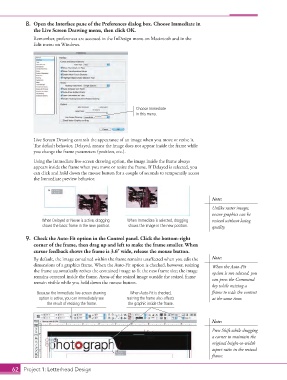
8. Open the Interface pane of the Preferences dialog box. Choose Immediate in
the Live Screen Drawing menu, then click OK.
Remember, preferences are accessed in the InDesign menu on Macintosh and in the
Edit menu on Windows.
Choose Immediate
in this menu.
Live Screen Drawing controls the appearance of an image when you move or resize it.
The default behavior, Delayed, means the image does not appear inside the frame while
you change the frame parameters (position, etc.).
Using the Immediate live-screen drawing option, the image inside the frame always
appears inside the frame when you move or resize the frame. If Delayed is selected, you
can click and hold down the mouse button for a couple of seconds to temporarily access
the Immediate preview behavior.
Note:
Unlike raster images,
vector graphics can be
When Delayed or Never is active, dragging When Immediate is selected, dragging resized without losing
shows the basic frame in the new position. shows the image in the new position. quality.
9. Check the Auto-Fit option in the Control panel. Click the bottom-right
corner of the frame, then drag up and left to make the frame smaller. When
cursor feedback shows the frame is 3.6 wide, release the mouse button.
By default, the image contained within the frame remains unaffected when you edit the Note:
dimensions of a graphics frame. When the Auto-Fit option is checked, however, resizing When the Auto-Fit
the frame automatically resizes the contained image to fit the new frame size; the image option is not selected, you
remains centered inside the frame. Areas of the resized image outside the resized frame can press the Command
remain visible while you hold down the mouse button.
key while resizing a
Because the Immediate live-screen drawing When Auto-Fit is checked, frame to scale the content
option is active, you can immediately see resizing the frame also affects at the same time.
the result of resizing the frame. the graphic inside the frame.
Note:
Text Press Shift while dragging
Here a corner to maintain the
original height-to-width
aspect ratio in the resized
frame.
62 Project 1: Letterhead Design

