


Page 47 - CS6_ID_Look_Inside
P. 47
change color values
                  Although there are several default color choices built into the Swatches panel of every
                  InDesign file, you are not limited to these few options. You can define virtually any
                  color based on specific values of component colors.
                      When you are building a page to be printed, you should use CMYK colors.
                  The CMYK color model, also called process color, uses subtractive color theory to
                  reproduce the range of printable colors by overlapping semi-transparent layers of cyan,
                  magenta, yellow, and black inks in varying percentages from 0–100.
                      In process-color printing, these four colors of ink are imaged (or separated) onto
                  individual printing plates. Each color separation is printed with a separate unit of a
                  printing press. When printed on top of each other in varying percentages, the semi-
                  transparent inks produce the CMYK gamut, or the range of possible colors. Special
                  (spot) colors can also be included in a job by using specifically formulated inks as
                  additional color separations.


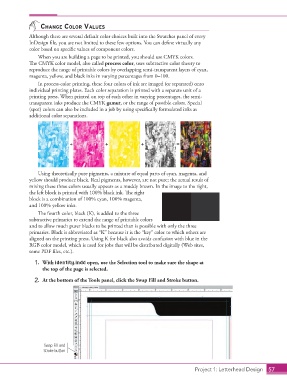
                                   +              +             +              =


                      Using theoretically pure pigments, a mixture of equal parts of cyan, magenta, and
                  yellow should produce black. Real pigments, however, are not pure; the actual result of
                  mixing these three colors usually appears as a muddy brown. In the image to the right,
                  the left block is printed with 100% black ink. The right
                  block is a combination of 100% cyan, 100% magenta,
                  and 100% yellow inks.
                      The fourth color, black (K), is added to the three
                  subtractive primaries to extend the range of printable colors
                  and to allow much purer blacks to be printed than is possible with only the three
                  primaries. Black is abbreviated as “K” because it is the “key” color to which others are
                  aligned on the printing press. Using K for black also avoids confusion with blue in the
                  RGB color model, which is used for jobs that will be distributed digitally (Web sites,
                  some PDF files, etc.).

                    1.  With identity.indd open, use the Selection tool to make sure the shape at
                        the top of the page is selected.

                    2.  At the bottom of the Tools panel, click the Swap Fill and Stroke button.


                        Swap Fill and
                        Stroke button


                                                                                      Project 1: Letterhead Design  57

