


Page 27 - CC2017_ID_Look_Inside
P. 27
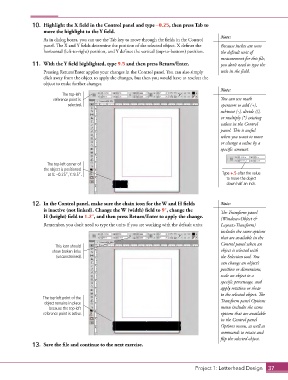
10.  Highlight the X field in the Control panel and type –0.25, then press Tab to
                   move the highlight to the Y field.
                                                                                            Note:
                   As in dialog boxes, you can use the Tab key to move through the fields in the Control
                   panel. The X and Y fields determine the position of the selected object. X defines the   Because inches are now
                   horizontal (left-to-right) position, and Y defines the vertical (top-to-bottom) position.  the default unit of
                                                                                            measurement for this file,
               11.  With the Y field highlighted, type 9.5 and then press Return/Enter.     you don’t need to type the
                   Pressing Return/Enter applies your changes in the Control panel. You can also simply   unit in the field.
                   click away from the object to apply the changes, but then you would have to reselect the
                   object to make further changes.
                                                                                            Note:
                           The top-left
                       reference point is                                                   You can use math
                             selected.                                                      operators to add (+),
                                                                                            subtract (-), divide (/),
                                                                                            or multiply (*) existing
                                                                                            values in the Control
                                                                                            panel. This is useful
                                                                                            when you want to move
                                                                                            or change a value by a
                                                                                            specific amount.


                     The top-left corner of
                   the object is positioned
                     at X: –0.25”, Y: 9.5”.                                                  Type +.5 after the value
                                                                                              to move the object
                                                                                               down half an inch.


               12.  In the Control panel, make sure the chain icon for the W and H fields    Note:
                   is inactive (not linked). Change the W (width) field to 9″, change the    The Transform panel
                   H (height) field to 1.2″, and then press Return/Enter to apply the change.
                                                                                            (Window>Object &
                   Remember, you don’t need to type the units if you are working with the default units.  Layout>Transform)
                                                                                            includes the same options
                                                                                            that are available in the
                                                                                            Control panel when an
                        This icon should
                       show broken links                                                    object is selected with
                        (unconstrained).                                                    the Selection tool. You
                                                                                            can change an object’s
                                                                                            position or dimensions,
                                                                                            scale an object to a
                                                                                            specific percentage, and
                                                                                            apply rotation or shear
                                                                                            to the selected object. The
                   The top-left point of the
                   object remains in place                                                  Transform panel Options
                     because the top-left                                                   menu includes the same
                   reference point is active.                                               options that are available
                                                                                            in the Control panel
                                                                                            Options menu, as well as
                                                                                            commands to rotate and
                                                                                            flip the selected object.
               13.  Save the file and continue to the next exercise.


                                                                                  Project 1: Letterhead Design  37

