


Page 49 - Adobe Indesign CC 2020
P. 49
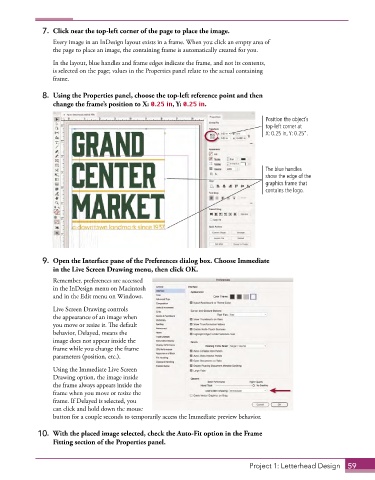
7.  Click near the top-left corner of the page to place the image.
                 Every image in an InDesign layout exists in a frame. When you click an empty area of
                 the page to place an image, the containing frame is automatically created for you.
                 In the layout, blue handles and frame edges indicate the frame, and not its contents,
                 is selected on the page; values in the Properties panel relate to the actual containing
                 frame.

              8.  Using the Properties panel, choose the top-left reference point and then
                 change the frame’s position to X: 0.25 in, Y: 0.25 in.

                                                                                  Position the object’s
                                                                                  top-left corner at
                                                                                  X: 0.25 in, Y: 0.25”.


                                                                                  The blue handles
                                                                                  show the edge of the
                                                                                  graphics frame that
                                                                                  contains the logo.


              9.  Open the Interface pane of the Preferences dialog box. Choose Immediate
                 in the Live Screen Drawing menu, then click OK.

                 Remember, preferences are accessed
                 in the InDesign menu on Macintosh
                 and in the Edit menu on Windows.
                 Live Screen Drawing controls
                 the appearance of an image when
                 you move or resize it. The default
                 behavior, Delayed, means the
                 image does not appear inside the
                 frame while you change the frame
                 parameters (position, etc.).

                 Using the Immediate Live Screen
                 Drawing option, the image inside
                 the frame always appears inside the
                 frame when you move or resize the
                 frame. If Delayed is selected, you
                 can click and hold down the mouse
                 button for a couple seconds to temporarily access the Immediate preview behavior.

             10.  With the placed image selected, check the Auto-Fit option in the Frame
                 Fitting section of the Properties panel.


                                                                             Project 1: Letterhead Design  59

