


Page 33 - Adobe Indesign CC 2020
P. 33
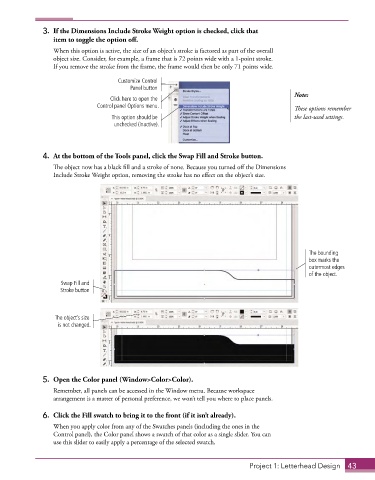
3.  If the Dimensions Include Stroke Weight option is checked, click that
                 item to toggle the option off.
                 When this option is active, the size of an object’s stroke is factored as part of the overall
                 object size. Consider, for example, a frame that is 72 points wide with a 1-point stroke.
                 If you remove the stroke from the frame, the frame would then be only 71 points wide.

                                     Customize Control
                                         Panel button
                                                                                           Note:
                                   Click here to open the
                               Control panel Options menu.                                 These options remember
                                   This option should be                                   the last-used settings.
                                    unchecked (inactive).


              4.  At the bottom of the Tools panel, click the Swap Fill and Stroke button.
                 The object now has a black fill and a stroke of none. Because you turned off the Dimensions
                 Include Stroke Weight option, removing the stroke has no effect on the object’s size.


                                                                                               The bounding
                                                                                               box marks the
                                                                                               outermost edges
                                                                                               of the object.
                    Swap Fill and
                   Stroke button


                  The object’s size
                   is not changed.


              5.  Open the Color panel (Window>Color>Color).
                 Remember, all panels can be accessed in the Window menu. Because workspace
                 arrangement is a matter of personal preference, we won’t tell you where to place panels.

              6.  Click the Fill swatch to bring it to the front (if it isn’t already).
                 When you apply color from any of the Swatches panels (including the ones in the
                 Control panel), the Color panel shows a swatch of that color as a single slider. You can
                 use this slider to easily apply a percentage of the selected swatch.


                                                                             Project 1: Letterhead Design  43

