


Page 32 - CS6_AI_Look_Inside.pdf
P. 32
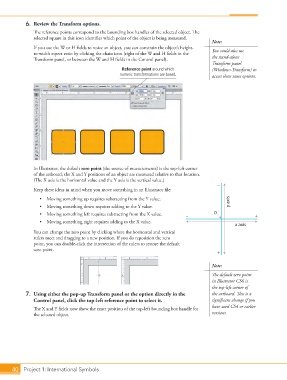
6.  Review the Transform options.
                    The reference points correspond to the bounding box handles of the selected object. The
                    selected square in this icon identifies which point of the object is being measured.
                                                                                             Note:
                    If you use the W or H fields to resize an object, you can constrain the object’s height-  You could also use
                    to-width aspect ratio by clicking the chain icon (right of the W and H fields in the
                    Transform panel, or between the W and H fields in the Control panel).    the stand-alone
                                                                                             Transform panel
                                                        Reference point around which         (Window>Transform) to
                                                        numeric transformations are based.   access these same options.


                    In Illustrator, the default zero point (the source of measurements) is the top-left corner
                    of the artboard; the X and Y positions of an object are measured relative to that location.
                    (The X axis is the horizontal value and the Y axis is the vertical value.)
                                                                                               –
                    Keep these ideas in mind when you move something in an Illustrator file:
                       •  Moving something up requires subtracting from the Y value.                y axis
                       •  Moving something down requires adding to the Y value.
                       •  Moving something left requires subtracting from the X value.  –     0                +
                       •  Moving something right requires adding to the X value.
                                                                                                       x axis
                    You can change the zero point by clicking where the horizontal and vertical
                    rulers meet and dragging to a new position. If you do reposition the zero
                    point, you can double-click the intersection of the rulers to restore the default
                    zero point.
                                                                                               +

                                                                                             Note:

                                                                                             The default zero point
                                                                                             in Illustrator CS6 is
                                                                                             the top-left corner of
                 7.  Using either the pop-up Transform panel or the option directly in the   the artboard. This is a
                    Control panel, click the top-left reference point to select it.          significant change if you

                    The X and Y fields now show the exact position of the top-left bounding box handle for   have used CS4 or earlier
                    the selected object.                                                     versions.


           40 Project 1: International Symbols

