


Page 55 - CC2017_AI_Look_Inside
P. 55
Transforming Objects with the Bounding Box

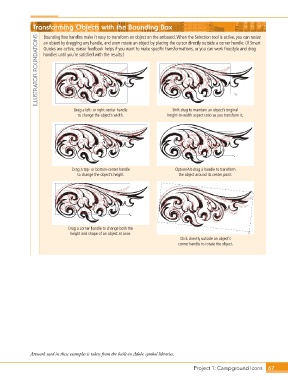
                   Bounding box handles make it easy to transform an object on the artboard. When the Selection tool is active, you can resize
                ILLUSTRATOR FOUNDATIONS  handles until you’re satisfied with the results.)
                   an object by dragging any handle, and even rotate an object by placing the cursor directly outside a corner handle. (If Smart
                   Guides are active, cursor feedback helps if you want to make specific transformations, or you can work freestyle and drag


                                Drag a left- or right-center handle     Shift-drag to maintain an object’s original
                                 to change the object’s width.        height-to-width aspect ratio as you transform it.


                               Drag a top- or bottom-center handle       Option/Alt-drag a handle to transform
                                 to change the object’s height.            the object around its center point.


                             Drag a corner handle to change both the
                              height and shape of an object at once.
                                                                           Click directly outside an object’s
                                                                           corner handle to rotate the object.


              Artwork used in these examples is taken from the built-in Adobe symbol libraries.


                                                                                 Project 1: Campground Icons    67

