


Page 59 - CC2017_AI_Look_Inside
P. 59
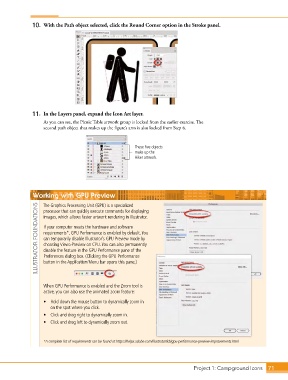
10.  With the Path object selected, click the Round Corner option in the Stroke panel.


               11.  In the Layers panel, expand the Icon Art layer.

                   As you can see, the Picnic Table artwork group is locked from the earlier exercise. The
                   second path object that makes up the figure’s arm is also locked from Step 6.


                                                         These five objects
                                                         make up the
                                                         Hiker artwork.


               Working with GPU Preview

                ILLUSTRATOR FOUNDATIONS  If your computer meets the hardware and software
                   The Graphics Processing Unit (GPU) is a specialized
                   processor that can quickly execute commands for displaying
                   images, which allows faster artwork rendering in Illustrator.


                   requirements*, GPU Performance is enabled by default. You
                   can temporarily disable Illustrator’s GPU Preview mode by
                   choosing View>Preview on CPU. You can also permanently
                   disable the feature in the GPU Performance pane of the
                   Preferences dialog box. (Clicking the GPU Performance
                   button in the Application/Menu bar opens this pane.)


                   When GPU Performance is enabled and the Zoom tool is
                   active, you can also use the animated zoom feature:

                   •  Hold down the mouse button to dynamically zoom in
                      on the spot where you click.
                   •  Click and drag right to dynamically zoom in.
                   •  Click and drag left to dynamically zoom out.


                   *A complete list of requirements can be found at https://helpx.adobe.com/illustrator/kb/gpu-performance-preview-improvements.html


                                                                                 Project 1: Campground Icons    71

