


Page 58 - CC2017_AI_Look_Inside
P. 58
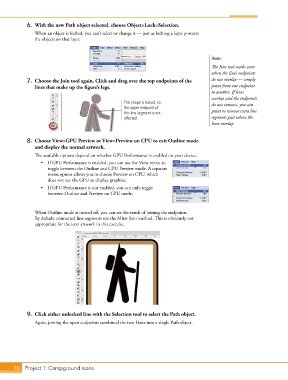
6.  With the new Path object selected, choose Object>Lock>Selection.
               When an object is locked, you can’t select or change it — just as locking a layer protects
               the objects on that layer.


                                                                                        Note:
                                                                                        The Join tool works even
                                                                                        when the line’s endpoints
            7.  Choose the Join tool again. Click and drag over the top endpoints of the   do not overlap — simply
               lines that make up the figure’s legs.                                    paint from one endpoint
                                                                                        to another. If lines
                                                                                        overlap and the endpoints
                                                    This shape is locked, so            do not connect, you can
                                                    the upper endpoint of               paint to remove extra line
                                                    this line segment is not
                                                    affected.                           segments past where the
                                                                                        lines overlap.


            8.  Choose View>GPU Preview or View>Preview on CPU to exit Outline mode
               and display the normal artwork.
               The available options depend on whether GPU Performance is enabled on your device.
                  •  If GPU Performance is enabled, you can use the View menu to
                     toggle between the Outline and GPU Preview mode. A separate
                     menu option allows you to choose Preview on CPU, which
                     does not use the GPU to display graphics.
                  •  If GPU Performance is not enabled, you can only toggle
                     between Outline and Preview on CPU mode.


               When Outline mode is turned off, you can see the result of joining the endpoints.
               By default, connected line segments use the Miter Join method. This is obviously not
               appropriate for the icon artwork in this exercise.


            9.  Click either unlocked line with the Selection tool to select the Path object.
               Again, joining the open endpoints combined the two Lines into a single Path object.


       70 Project 1: Campground Icons

