


Page 26 - CS6_WD_Look_Inside
P. 26
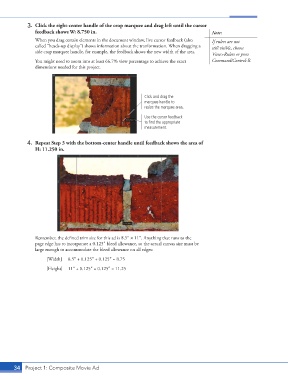
3.  Click the right-center handle of the crop marquee and drag left until the cursor
                    feedback shows W: 8.750 in.                                              Note:
                    When you drag certain elements in the document window, live cursor feedback (also   If rulers are not
                    called “heads-up display”) shows information about the tranformation. When dragging a   still visible, choose
                    side crop marquee handle, for example, the feedback shows the new width of the area.
                                                                                             View>Rulers or press
                    You might need to zoom into at least 66.7% view percentage to achieve the exact   Command/Control-R.
                    dimensions needed for this project.


                                                                 Click and drag the
                                                                 marquee handle to
                                                                 resize the marquee area.
                                                                 Use the cursor feedback
                                                                 to find the appropriate
                                                                 measurement.


                 4.  Repeat Step 3 with the bottom-center handle until feedback shows the area of
                    H: 11.250 in.


                    Remember, the defined trim size for this ad is 8.5″ 1 11″. Anything that runs to the
                    page edge has to incorporate a 0.125″ bleed allowance, so the actual canvas size must be
                    large enough to accommodate the bleed allowance on all edges:

                         [Width]   8.5″ + 0.125″ + 0.125″ = 8.75
                         [Height]   11″ + 0.125″ + 0.125″ = 11.25


           34 Project 1: Composite Movie Ad

