


Page 58 - CC 2019 WD Look Inside
P. 58
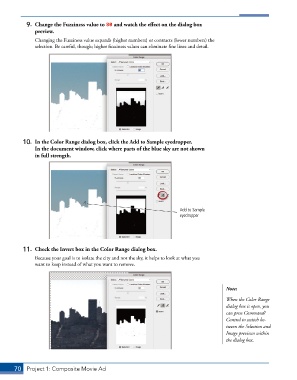
9.  Change the Fuzziness value to 80 and watch the effect on the dialog box
               preview.
               Changing the Fuzziness value expands (higher numbers) or contracts (lower numbers) the
               selection. Be careful, though; higher fuzziness values can eliminate fine lines and detail.


          10.  In the Color Range dialog box, click the Add to Sample eyedropper.
              In the document window, click where parts of the blue sky are not shown
              in full strength.


                                                                      Add to Sample
                                                                      eyedropper


          11.  Check the Invert box in the Color Range dialog box.
               Because your goal is to isolate the city and not the sky, it helps to look at what you
               want to keep instead of what you want to remove.


                                                                                        Note:
                                                                                        When the Color Range
                                                                                        dialog box is open, you
                                                                                        can press Command/
                                                                                        Control to switch be-
                                                                                        tween the Selection and
                                                                                        Image previews within
                                                                                        the dialog box.


       70  Project 1: Composite Movie Ad

