


Page 33 - CC 2019 WD Look Inside
P. 33
Understanding Smart Guides

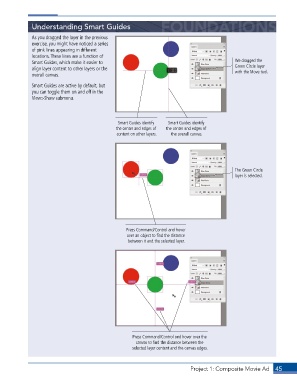
             As you dragged the layer in the previous
             exercise, you might have noticed a series
             of pink lines appearing in different
             locations. These lines are a function of
             Smart Guides, which make it easier to                                          We dragged the
             align layer content to other layers or the                                     Green Circle layer
             overall canvas.                                                                with the Move tool.

             Smart Guides are active by default, but
             you can toggle them on and off in the
             View>Show submenu.


                                               Smart Guides identify   Smart Guides identify
                                              the center and edges of   the center and edges of
                                              content on other layers.  the overall canvas.


                                                                                            The Green Circle
                                                                                            layer is selected.


                                                  Press Command/Control and hover
                                                  over an object to find the distance
                                                  between it and the selected layer.


                                                    Press Command/Control and hover over the
                                                     canvas to find the distance between the
                                                    selected layer content and the canvas edges.


                                                                          Project 1: Composite Movie Ad    45

