


Page 28 - CC 2019 WD Look Inside
P. 28
Drag a File to Composite Images
         Compositing multiple images in Photoshop is a fairly simple process — or at least,
         it starts out that way. There are, of course, a number of technical and aesthetic issues
         that you must resolve when you combine multiple images in a single design.     Note:
                                                                                        When you created the
           1.  With aftermath.psd open, open the file Storm.jpg from your               background file for
               WIP>Movie folder.                                                        this project, you cre-
                                                                                        ated a raster image that
           2.  With Storm.jpg the active file in the document window, open the Image    contains pixels. Digital
              Size dialog box (Image>Image Size).
                                                                                        photographs and scans
               Remember that you                                                        are also pixel-based,
               can press Command-                                                       which is why you use
               Option-I/Control-Alt-I                                                   Photoshop to edit and
               to open the dialog box.
                                                                                        manipulate those types
               This image is only 180                                                   of files.
               ppi, but it has a physical
               size much larger than the
               defined ad size. As with
               the original bricks image,
               the principle of effective
               resolution might make this image usable in the composite ad.

           3.  Click Cancel to close the Image Size dialog box.

           4.  Open the Window>Arrange menu and choose 2-up Vertical to show both
              open files at once.
               As you saw in the Interface chapter, these options are useful for arranging and viewing
               multiple open files within your workspace.

           5.  Choose the Move tool in the Tools panel.

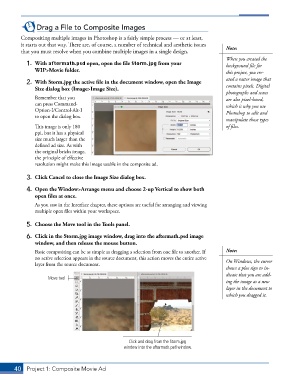
           6.  Click in the Storm.jpg image window, drag into the aftermath.psd image
              window, and then release the mouse button.
               Basic compositing can be as simple as dragging a selection from one file to another. If   Note:
               no active selection appears in the source document, this action moves the entire active   On Windows, the cursor
               layer from the source document.
                                                                                        shows a plus sign to in-
                                                                                        dicate that you are add-
                    Move tool
                                                                                        ing the image as a new
                                                                                        layer in the document to
                                                                                        which you dragged it.


                                                   Click and drag from the Storm.jpg
                                                 window into the aftermath.psd window.


       40  Project 1: Composite Movie Ad

