


Page 24 - CC2018_WD_Look_Inside
P. 24
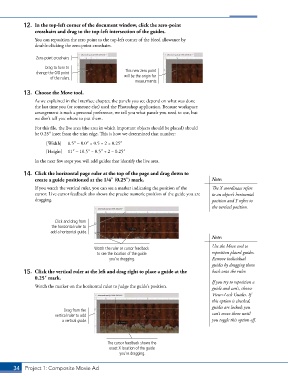
12.  In the top-left corner of the document window, click the zero-point
               crosshairs and drag to the top-left intersection of the guides.

               You can reposition the zero point to the top-left corner of the bleed allowance by
               double-clicking the zero-point crosshairs.

                Zero-point crosshairs

                    Drag to here to
                change the 0/0 point                 This new zero point
                      of the rulers.                will be the origin for
                                                         measurments.

           13.  Choose the Move tool.
               As we explained in the Interface chapter, the panels you see depend on what was done
               the last time you (or someone else) used the Photoshop application. Because workspace
               arrangement is such a personal preference, we tell you what panels you need to use, but
               we don’t tell you where to put them.
               For this file, the live area (the area in which important objects should be placed) should
               be 0.253 inset from the trim edge. This is how we determined that number:
                    [Width]   8.53 – 8.03 = 0.5 ÷ 2 = 0.253
                    [Height]   113 – 10.53 = 0.53 ÷ 2 = 0.253

               In the next few steps you will add guides that identify the live area.

           14.  Click the horizontal page ruler at the top of the page and drag down to
               create a guide positioned at the 1/43 (0.253) mark.                      Note:
               If you watch the vertical ruler, you can see a marker indicating the position of the   The X coordinate refers
               cursor. Live cursor feedback also shows the precise numeric position of the guide you are   to an object’s horizontal
               dragging.                                                                position and Y refers to
                                                                                        the vertical position.


                        Click and drag from
                      the horizontal ruler to
                      add a horizontal guide.
                                                                                        Note:

                                                                                        Use the Move tool to
                                        Watch the ruler or cursor feedback
                                         to see the location of the guide               reposition placed guides.
                                              you’re dragging.                          Remove individual
                                                                                        guides by dragging them
           15.  Click the vertical ruler at the left and drag right to place a guide at the   back onto the ruler.
               0.253 mark.
                                                                                        If you try to reposition a
               Watch the marker on the horizontal ruler to judge the guide’s position.  guide and can’t, choose
                                                                                        View>Lock Guides. If
                                                                                        this option is checked,
                                                                                        guides are locked; you
                           Drag from the
                        vertical ruler to add                                           can’t move them until
                           a vertical guide.                                            you toggle this option off.


                                             The cursor feedback shows the
                                              exact X location of the guide
                                                  you’re dragging.


       34 Project 1: Composite Movie Ad

