


Page 29 - CC2018_WD_Look_Inside
P. 29
7.  Click the Close button on the Storm.jpg document tab to close that file.
                   After closing the storm file, the aftermath.psd document window expands to fill the
                   available space.

                   If you remember from the Image Size dialog box, the storm image was 17.13 1 11.43 at
                   180 ppi. Photoshop cannot maintain multiple resolutions in a single file. When you
                   move the image content into the aftermath file, it adopts the resolution of the target file
                   (in this case, 300 ppi). The concept of effective resolution transforms the storm image/
                   layer to approximately 10.253 1 6.8253 at 300 ppi.

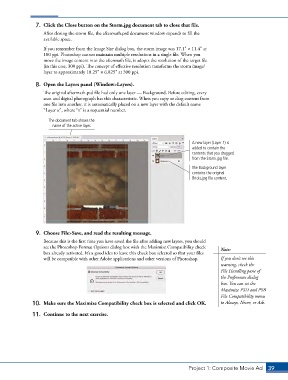
                8.  Open the Layers panel (Window>Layers).
                   The original aftermath.psd file had only one layer — Background. Before editing, every
                   scan and digital photograph has this characteristic. When you copy or drag content from
                   one file into another, it is automatically placed on a new layer with the default name
                   “Layer n”, where “n” is a sequential number.
                     The document tab shows the
                       name of the active layer.


                                                                                A new layer (Layer 1) is
                                                                                added to contain the
                                                                                contents that you dragged
                                                                                from the Storm.jpg file.
                                                                                The Background layer
                                                                                contains the original
                                                                                Bricks.jpg file content.


                9.  Choose File>Save, and read the resulting message.
                   Because this is the first time you have saved the file after adding new layers, you should
                   see the Photoshop Format Options dialog box with the Maximize Compatibility check   Note:
                   box already activated. It’s a good idea to leave this check box selected so that your files
                   will be compatible with other Adobe applications and other versions of Photoshop.  If you don’t see this
                                                                                            warning, check the
                                                                                            File Handling pane of
                                                                                            the Preferences dialog
                                                                                            box. You can set the
                                                                                            Maximize PSD and PSB
                                                                                            File Compatibility menu
               10.  Make sure the Maximize Compatibility check box is selected and click OK.   to Always, Never, or Ask.

               11.  Continue to the next exercise.


                                                                               Project 1: Composite Movie Ad    39

