


Page 43 - CC2019_PS_Look_Inside
P. 43
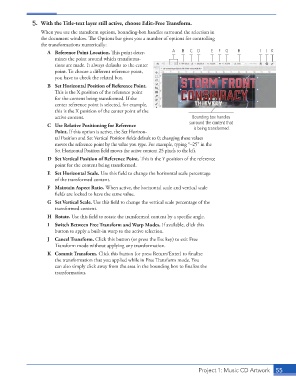
5.  With the Title-text layer still active, choose Edit>Free Transform.
                      When you use the transform options, bounding-box handles surround the selection in
                      the document window. The Options bar gives you a number of options for controlling
                      the transformations numerically:
                         A  Reference Point Location. This point deter-  A  B  C  D    E  F  G   H        I  J K
                           mines the point around which transforma-
                           tions are made. It always defaults to the center
                           point. To choose a different reference point,
                           you have to check the related box.
                         B  Set Horizontal Position of Reference Point.
                           This is the X position of the reference point
                           for the content being transformed. If the
                           center reference point is selected, for example,
                           this is the X position of the center point of the
                           active content.                                      Bounding box handles
                         C  Use Relative Positioning for Reference             surround the content that
                           Point. If this option is active, the Set Horizon-     is being transformed.
                           tal Position and Set Vertical Position fields default to 0; changing these values
                           moves the reference point by the value you type. For example, typing “–25” in the
                           Set Horizontal Posi tion field moves the active content 25 pixels to the left.
                         D  Set Vertical Position of Reference Point. This is the Y position of the reference
                           point for the content being transformed.
                         E  Set Horizontal Scale. Use this field to change the horizontal scale percentage
                           of the transformed content.
                         F  Maintain Aspect Ratio. When active, the horizontal scale and vertical scale
                           fields are locked to have the same value.
                         G  Set Vertical Scale. Use this field to change the vertical scale percentage of the
                           transformed content.
                         H  Rotate. Use this field to rotate the transformed content by a specific angle.
                         I  Switch Between Free Transform and Warp Modes. If available, click this
                           button to apply a built-in warp to the active selection.
                         J  Cancel Transform. Click this button (or press the Esc key) to exit Free
                           Transform mode without applying any transformation.
                         K  Commit Transform. Click this button (or press Return/Enter) to finalize
                           the transformation that you applied while in Free Transform mode. You
                           can also simply click away from the area in the bounding box to finalize the
                           transformation.


                                                                                  Project 1: Music CD Artwork   55

