


Page 46 - CC2019_PS_Look_Inside
P. 46
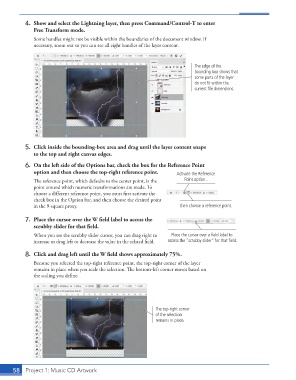
4.  Show and select the Lightning layer, then press Command/Control-T to enter
                   Free Transform mode.
                   Some handles might not be visible within the boundaries of the document window. If
                   necessary, zoom out so you can see all eight handles of the layer content.


                                                                                 The edge of the
                                                                                 bounding box shows that
                                                                                 some parts of the layer
                                                                                 do not fit within the
                                                                                 current file dimensions.


                5.  Click inside the bounding-box area and drag until the layer content snaps
                   to the top and right canvas edges.

                6.  On the left side of the Options bar, check the box for the Reference Point
                   option and then choose the top-right reference point.  Activate the Reference
                   The reference point, which defaults to the center point, is the   Point option...
                   point around which numeric transformations are made. To
                   choose a different reference point, you must first activate the
                   check box in the Option bar, and then choose the desired point
                   in the 9-square proxy.                                  then choose a reference point.

                7.  Place the cursor over the W field label to access the
                   scrubby slider for that field.

                   When you see the scrubby slider cursor, you can drag right to   Place the cursor over a field label to
                   increase or drag left to decrease the value in the related field.  access the “scrubby slider” for that field.

                8.  Click and drag left until the W field shows approximately 75%.
                   Because you selected the top-right reference point, the top-right corner of the layer
                   remains in place when you scale the selection. The bottom-left corner moves based on
                   the scaling you define.


                                                                  The top-right corner
                                                                  of the selection
                                                                  remains in place.


           58   Project 1: Music CD Artwork

