


Page 16 - CC2019_PS_Look_Inside
P. 16
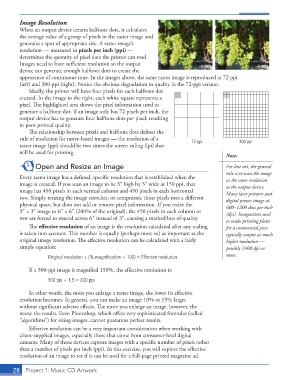
Image Resolution
              When an output device creates halftone dots, it calculates
              the average value of a group of pixels in the raster image and
              generates a spot of appropriate size. A raster image’s
              resolution — measured in  pixels per inch (ppi) —
              determines the quantity of pixel data the printer can read.
              Images need to have suffi  cient resolution so the output
              device can generate enough halftone dots to create the
              appearance of continuous tone. In the images above, the same raster image is reproduced at 72 ppi
              (left) and 300 ppi (right). Notice the obvious degradation in quality in the 72-ppi version.
                 Ideally, the printer will have four pixels for each halftone dot
              created. In the image to the right, each white square represents a
              pixel. Th  e highlighted area shows the pixel information used to
              generate a halftone dot. If an image only has 72 pixels per inch, the
              output device has to generate four halftone dots per pixel, resulting
              in poor printed quality.
                 Th  e relationship between pixels and halftone dots defi nes the
              rule of resolution for raster-based images — the resolution of a   72 ppi           300 ppi
              raster image (ppi) should be two times the screen ruling (lpi) that
              will be used for printing.
                                                                                             Note:
                    Open and Resize an Image                                                 For line art, the general
                                                                                             rule is to scan the image
              Every raster image has a defi ned, specifi c resolution that is established when the   at the same resolution
              image is created. If you scan an image to be 3″ high by 3″ wide at 150 ppi, that   as the output device.
              image has 450 pixels in each vertical column and 450 pixels in each horizontal   Many laser printers and
              row. Simply resizing the image stretches, or compresses, those pixels into a diff erent   digital presses image at
              physical space, but does not add or remove pixel information. If you resize the   600–1200  dots per inch
              3″ × 3″ image to 6″ × 6″ (200% of the original), the 450 pixels in each column or   (dpi). Imagesetters used
              row are forced to extend across 6″ instead of 3″, causing a marked loss of quality.  to make printing plates
                  Th  e  eff ective  resolution of an image is the resolution calculated after any scaling   for a commercial press
              is taken into account. Th  is number is equally (perhaps more so) as important as the   typically output at much
              original image resolution. Th  e eff ective resolution can be calculated with a fairly   higher resolution —
              simple equation:                                                               possibly 2400 dpi or
                         Original resolution ÷ (% magnifi cation ÷ 100) = Effective resolution  more.

                 If a 300-ppi image is magnifi ed 150%, the eff ective resolution is:

                         300 ppi ÷ 1.5 = 200 ppi
                 In other words, the more you enlarge a raster image, the lower its eff ective
              resolution becomes. In general, you can make an image 10% or 15% larger
              without signifi cant adverse eff ects. Th  e more you enlarge an image, however, the
              worse the results. Even Photoshop, which off ers very sophisticated formulas (called
              “algorithms”) for sizing images, cannot guarantee perfect results.
                 Eff ective resolution can be a very important consideration when working with
              client-supplied images, especially those that come from consumer-level digital
              cameras. Many of those devices capture images with a specifi c number of pixels rather
              than a number of pixels per inch (ppi). In this exercise, you will explore the eff ective
              resolution of an image to see if it can be used for a full-page printed magazine ad.


           28     Project 1: Music CD Artwork

