


Page 68 - CC2017_PS_Look_Inside
P. 68
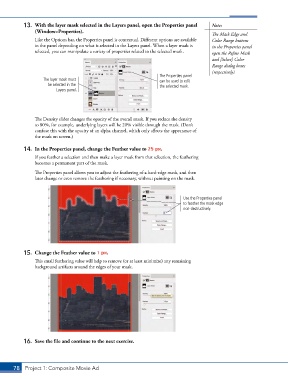
13.  With the layer mask selected in the Layers panel, open the Properties panel   Note:
               (Window>Properties).
                                                                                        The Mask Edge and
               Like the Options bar, the Properties panel is contextual. Different options are available   Color Range buttons
               in the panel depending on what is selected in the Layers panel. When a layer mask is   in the Properties panel
               selected, you can manipulate a variety of properties related to the selected mask.  open the Refine Mask
                                                                                        and [Select] Color
                                                                                        Range dialog boxes
                                                                                        (respectively).
                                                                   The Properties panel
                   The layer mask must                             can be used to edit
                     be selected in the                            the selected mask.
                        Layers panel.


               The Density slider changes the opacity of the overall mask. If you reduce the density
               to 80%, for example, underlying layers will be 20% visible through the mask. (Don’t
               confuse this with the opacity of an alpha channel, which only affects the appearance of
               the mask on screen.)


           14.  In the Properties panel, change the Feather value to 25 px.
               If you feather a selection and then make a layer mask from that selection, the feathering
               becomes a permanent part of the mask.

               The Properties panel allows you to adjust the feathering of a hard-edge mask, and then
               later change or even remove the feathering if necessary, without painting on the mask.


                                                                             Use the Properties panel
                                                                             to feather the mask edge
                                                                             non-destructively.


           15.  Change the Feather value to 1 px.
               This small feathering value will help to remove (or at least minimize) any remaining
               background artifacts around the edges of your mask.


           16.  Save the file and continue to the next exercise.


       78 Project 1: Composite Movie Ad

