


Page 64 - CC2017_PS_Look_Inside
P. 64
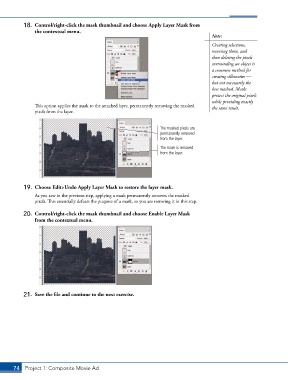
18.  Control/right-click the mask thumbnail and choose Apply Layer Mask from
               the contextual menu.
                                                                                        Note:

                                                                                        Creating selections,
                                                                                        reversing them, and
                                                                                        then deleting the pixels
                                                                                        surrounding an object is
                                                                                        a common method for
                                                                                        creating silhouettes —
                                                                                        but not necessarily the
                                                                                        best method. Masks
                                                                                        protect the original pixels
                                                                                        while providing exactly
               This option applies the mask to the attached layer, permanently removing the masked   the same result.
               pixels from the layer.


                                                                   The masked pixels are
                                                                   permanently removed
                                                                   from the layer.
                                                                   The mask is removed
                                                                   from the layer.


           19.  Choose Edit>Undo Apply Layer Mask to restore the layer mask.

               As you saw in the previous step, applying a mask permanently removes the masked
               pixels. This essentially defeats the purpose of a mask, so you are restoring it in this step.

           20.  Control/right-click the mask thumbnail and choose Enable Layer Mask
               from the contextual menu.


           21.  Save the file and continue to the next exercise.


       74 Project 1: Composite Movie Ad

