


Page 31 - CC2017_PS_Look_Inside
P. 31
CoPy And PAste seleCted Pixels
              In the previous exercise, you used the Move tool to drag an entire layer. You can
              also use a variety of selection tools to choose only certain areas of a layer that will be
              moved. In this exercise, you will use the most basic selection tool — the Rectangle
              Marquee tool.
                1.  With aftermath.psd open, choose View>Fit on Screen to show the entire
                   image centered in the document window.

                2.  Open the file Skyline.jpg from your WIP>Movie folder.

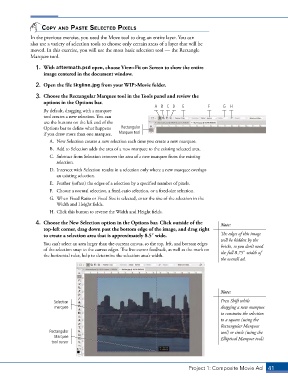
                3.  Choose the Rectangular Marquee tool in the Tools panel and review the
                   options in the Options bar.
                                                                 A B C D    E          F     G  H
                   By default, dragging with a marquee
                   tool creates a new selection. You can
                   use the buttons on the left end of the
                   Options bar to define what happens   Rectangular
                   if you draw more than one marquee.  Marquee tool
                      A.  New Selection creates a new selection each time you create a new marquee.
                      B.  Add to Selection adds the area of a new marquee to the existing selected area.
                      C.  Subtract from Selection removes the area of a new marquee from the existing
                        selection.
                      D.  Intersect with Selection results in a selection only where a new marquee overlaps
                        an existing selection.
                      E.  Feather (soften) the edges of a selection by a specified number of pixels.
                      F.  Choose a normal selection, a fixed-ratio selection, or a fixed-size selection.
                      G.  When Fixed Ratio or Fixed Size is selected, enter the size of the selection in the
                        Width and Height fields.
                      H. Click this button to reverse the Width and Height fields.
                4.  Choose the New Selection option in the Options bar. Click outside of the   Note:
                   top-left corner, drag down past the bottom edge of the image, and drag right
                   to create a selection area that is approximately 8.53 wide.              The edges of this image
                                                                                            will be hidden by the
                   You can’t select an area larger than the current canvas, so the top, left, and bottom edges   bricks, so you don’t need
                   of the selection snap to the canvas edges. The live cursor feedback, as well as the mark on   the full 8.753 width of
                   the horizontal ruler, help to determine the selection area’s width.
                                                                                            the overall ad.


                                                                                            Note:

                       Selection                                                            Press Shift while
                        marquee                                                             dragging a new marquee
                                                                                            to constrain the selection
                                                                                            to a square (using the
                                                                                            Rectangular Marquee
                     Rectangular                                                            tool) or circle (using the
                       Marquee                                                              Elliptical Marquee tool).
                      tool cursor


                                                                               Project 1: Composite Movie Ad    41

