


Page 27 - CC2017_PS_Look_Inside
P. 27
The Crop Tools in Depth When you finalize the crop, the resulting image will be
When the Crop tool is selected, the Options bar can be used to define a number of settings related to the cropped area.
PHOTOSHOP FOUNDATIONS common aspect ratio presets. If you resized to be 9 9, regardless of the actual size of the
The left menu includes a number of
crop marquee. This presents a problem if you remember the
choose one of these, the crop marquee
principles of resolution.
is constrained to the selected aspect
ratio. It’s important to note that these
Enlarging a 3 3 area (for example) to 9 9 means
presets do not define only the aspect
the application needs to create enough pixels to fill in the
ratio of the crop, not the actual size.
6 extra inches — at 300 ppi, Photoshop needs to create
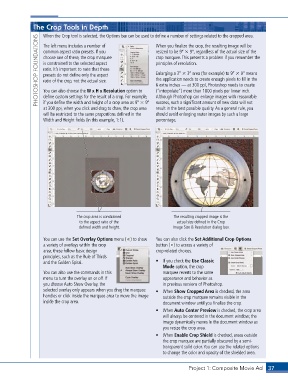
You can also choose the W x H x Resolution option to
Although Photoshop can enlarge images with reasonable
define custom settings for the result of a crop. For example,
if you define the width and height of a crop area as 9 9
success, such a significant amount of new data will not
result in the best possible quality. As a general rule, you
at 300 ppi, when you click and drag to draw, the crop area (“interpolate”) more than 1800 pixels per linear inch.
will be restricted to the same proportions defined in the should avoid enlarging raster images by such a large
Width and Height fields (in this example, 1:1). percentage.
The crop area is constrained The resulting cropped image is the
to the aspect ratio of the actual size defined in the Crop
defined width and height. Image Size & Resolution dialog box.
You can use the Set Overlay Options menu ( ) to show You can also click the Set Additional Crop Options
a variety of overlays within the crop button ( ) to access a variety of
area; these follow basic design crop-related choices.
principles, such as the Rule of Thirds
and the Golden Spiral. • If you check the Use Classic
Mode option, the crop
You can also use the commands in this marquee reverts to the same
menu to turn the overlay on or off. If appearance and behavior as
you choose Auto Show Overlay, the in previous versions of Photoshop.
selected overlay only appears when you drag the marquee • When Show Cropped Area is checked, the area
handles or click inside the marquee area to move the image outside the crop marquee remains visible in the
inside the crop area. document window until you finalize the crop.
• When Auto Center Preview is checked, the crop area
will always be centered in the document window; the
image dynamically moves in the document window as
you resize the crop area.
• When Enable Crop Shield is checked, areas outside
the crop marquee are partially obscured by a semi-
transparent solid color. You can use the related options
to change the color and opacity of the shielded area.
Project 1: Composite Movie Ad 37

