


Page 26 - CC2017_PS_Look_Inside
P. 26
19.  Choose View>New Guide again. Choose the Vertical option and type 8.375
               in the field. Click OK.


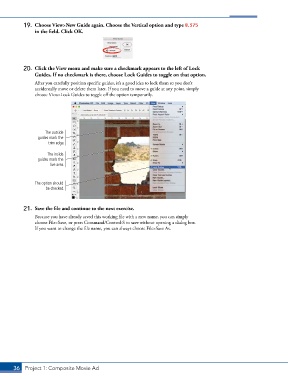
           20.  Click the View menu and make sure a checkmark appears to the left of Lock
               Guides. If no checkmark is there, choose Lock Guides to toggle on that option.

               After you carefully position specific guides, it’s a good idea to lock them so you don’t
               accidentally move or delete them later. If you need to move a guide at any point, simply
               choose View>Lock Guides to toggle off the option temporarily.


                    The outside
                 guides mark the
                     trim edge.

                     The inside
                 guides mark the
                      live area.


               The option should
                    be checked.


           21.  Save the file and continue to the next exercise.
               Because you have already saved this working file with a new name, you can simply
               choose File>Save, or press Command/Control-S to save without opening a dialog box.
               If you want to change the file name, you can always choose File>Save As.


       36 Project 1: Composite Movie Ad

