


Page 21 - CC2017_PS_Look_Inside
P. 21
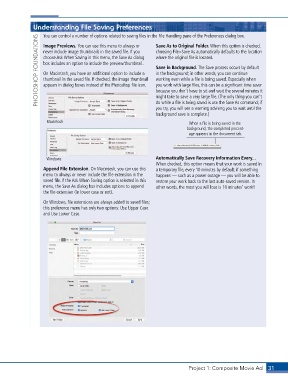
Understanding File Saving Preferences             Save As to Original Folder . When this option is checked,
                   You can control a number of options related to saving files in the File Handling pane of the Preferences dialog box.
                 PHOTOSHOP FOUNDATIONS  never include image thumbnails in the saved file. If you   choosing File>Save As automatically defaults to the location
                   Image Previews . You can use this menu to always or

                                                                 where the original file is located.
                   choose Ask When Saving in this menu, the Save As dialog
                   box includes an option to include the preview/thumbnail.
                                                                 Save in Background . The Save process occurs by default
                                                                 in the background; in other words, you can continue
                   On Macintosh, you have an additional option to include a
                   thumbnail in the saved file. If checked, the image thumbnail
                                                                 working even while a file is being saved. Especially when
                                                                 you work with large files, this can be a significant time saver
                   appears in dialog boxes instead of the Photoshop file icon.
                                                                 because you don’t have to sit and wait the several minutes it
                                                                 might take to save a very large file. (The only thing you can’t
                                                                 do while a file is being saved is use the Save As command; if
                                                                 you try, you will see a warning advising you to wait until the
                                                                 background save is complete.)
                    Macintosh                                                  When a file is being saved in the
                                                                              background, the completed percent-
                                                                               age appears in the document tab.


                    Windows                                      Automatically Save Recovery Information Every . . .
                                                                 When checked, this option means that your work is saved in
                   Append File Extension . On Macintosh, you can use this   a temporary file, every 10 minutes by default; if something
                   menu to always or never include the file extension in the   happens — such as a power outage — you will be able to
                   saved file. If the Ask When Saving option is selected in this   restore your work back to the last auto-saved version. In
                   menu, the Save As dialog box includes options to append   other words, the most you will lose is 10 minutes’ work!
                   the file extension (in lower case or not).
                   On Windows, file extensions are always added to saved files;
                   this preference menu has only two options: Use Upper Case
                   and Use Lower Case.


                                                                               Project 1: Composite Movie Ad    31

