


Page 19 - CC2017_PS_Look_Inside
P. 19
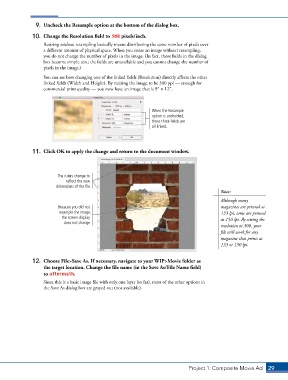
9.  Uncheck the Resample option at the bottom of the dialog box.
               10.  Change the Resolution field to 300 pixels/inch.

                   Resizing without resampling basically means distributing the same number of pixels over
                   a different amount of physical space. When you resize an image without resampling,
                   you do not change the number of pixels in the image. (In fact, those fields in the dialog
                   box become simple text; the fields are unavailable and you cannot change the number of
                   pixels in the image.)
                   You can see how changing one of the linked fields (Resolution) directly affects the other
                   linked fields (Width and Height). By resizing the image to be 300 ppi — enough for
                   commercial print quality — you now have an image that is 93 1 123.


                                                                When the Resample
                                                                option is unchecked,
                                                                these three fields are
                                                                all linked.


               11.  Click OK to apply the change and return to the document window.


                         The rulers change to
                            reflect the new
                        dimensions of the file.
                                                                                            Note:

                                                                                            Although many
                         Because you did not                                                magazines are printed at
                         resample the image,                                                133 lpi, some are printed
                          the screen display                                                at 150 lpi. By setting the
                           does not change.
                                                                                            resolution to 300, your
                                                                                            file will work for any
                                                                                            magazine that prints at
                                                                                            133 or 150 lpi.


               12.  Choose File>Save As. If necessary, navigate to your WIP>Movie folder as
                   the target location. Change the file name (in the Save As/File Name field)
                   to aftermath.
                   Since this is a basic image file with only one layer (so far), most of the other options in
                   the Save As dialog box are grayed out (not available).


                                                                               Project 1: Composite Movie Ad    29

