


Page 24 - Adobe Photoshop 2022
P. 24
Crop the Canvas and Place Ruler Guides                                        Watch the video
                                                                                              Cropping
         The final step in preparing the workspace is defining the live area of the page. Trim   Images in
         size is the actual size of a page once it has been cut out of the press sheet. According   Photoshop in your
         to your client, the final required artwork has a trim size of 10″ × 10″.       online student resources.
             Any elements that print right to the edge of a page (called bleeding) must actually
         extend beyond the defined trim size. The bleed allowance is the amount of extra space   Note:
         that should be included for these bleed objects. Most applications require at least a
         1/8″ bleed allowance on any bleed edge.                                        You should familiarize
             Because of inherent variation in the mechanical printing and trimming      yourself with the most
         processes, most printing projects also define a safe or live area. All important design   common fraction-to-
         elements — especially text — should stay within this live area. The live area for this   decimal equivalents:
         project is 9.5″ × 9.5″ (leaving a 0.25″ safe margin on each edge of the artwork).  1/8 = 0.125
                                                                                           1/4 = 0.25
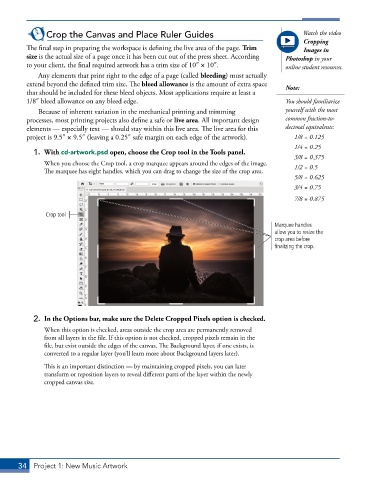
           1.  With cd-artwork.psd open, choose the Crop tool in the Tools panel.
                                                                                           3/8 = 0.375
               When you choose the Crop tool, a crop marquee appears around the edges of the image.   1/2 = 0.5
               The marquee has eight handles, which you can drag to change the size of the crop area.
                                                                                           5/8 = 0.625
                                                                                           3/4 = 0.75
                                                                                           7/8 = 0.875

               Crop tool
                                                                                     Marquee handles
                                                                                     allow you to resize the
                                                                                     crop area before
                                                                                     finalizing the crop.


           2.  In the Options bar, make sure the Delete Cropped Pixels option is checked.
               When this option is checked, areas outside the crop area are permanently removed
               from all layers in the file. If this option is not checked, cropped pixels remain in the
               file, but exist outside the edges of the canvas. The Background layer, if one exists, is
               converted to a regular layer (you’ll learn more about Background layers later).

               This is an important distinction — by maintaining cropped pixels, you can later
               transform or reposition layers to reveal different parts of the layer within the newly
               cropped canvas size.


       34  Project 1: New Music Artwork

