


Page 25 - Adobe Photoshop 2022
P. 25
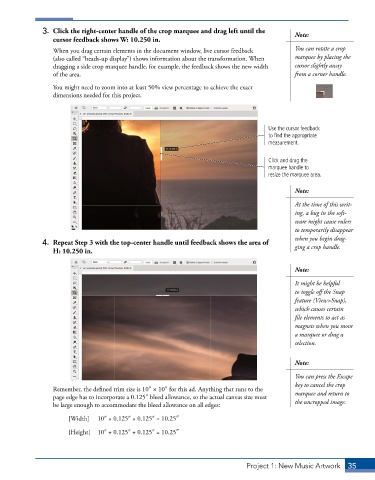
3.  Click the right-center handle of the crop marquee and drag left until the   Note:
                 cursor feedback shows W: 10.250 in.
                 When you drag certain elements in the document window, live cursor feedback   You can rotate a crop
                 (also called “heads-up display”) shows information about the transformation. When   marquee by placing the
                 dragging a side crop marquee handle, for example, the feedback shows the new width   cursor slightly away
                 of the area.                                                              from a corner handle.

                 You might need to zoom into at least 50% view percentage to achieve the exact
                 dimensions needed for this project.


                                                                                   Use the cursor feedback
                                                                                   to find the appropriate
                                                                                   measurement.


                                                                                   Click and drag the
                                                                                   marquee handle to
                                                                                   resize the marquee area.

                                                                                           Note:
                                                                                           At the time of this writ-
                                                                                           ing, a bug in the soft-
                                                                                           ware might cause rulers
                                                                                           to temporarily disappear
                                                                                           when you begin drag-
              4.  Repeat Step 3 with the top-center handle until feedback shows the area of   ging a crop handle.
                 H: 10.250 in.


                                                                                           Note:
                                                                                           It might be helpful
                                                                                           to toggle off the Snap
                                                                                           feature (View>Snap),
                                                                                           which causes certain
                                                                                           file elements to act as
                                                                                           magnets when you move
                                                                                           a marquee or drag a
                                                                                           selection.


                                                                                           Note:

                                                                                           You can press the Escape
                                                                                           key to cancel the crop
                 Remember, the defined trim size is 10″ × 10″ for this ad. Anything that runs to the   marquee and return to
                 page edge has to incorporate a 0.125″ bleed allowance, so the actual canvas size must
                 be large enough to accommodate the bleed allowance on all edges:          the uncropped image.

                      [Width]   10″ + 0.125″ + 0.125″ = 10.25″

                      [Height]   10″ + 0.125″ + 0.125″ = 10.25″


                                                                            Project 1: New Music Artwork   35

