


Page 61 - CC2018_ID_Look_Inside
P. 61
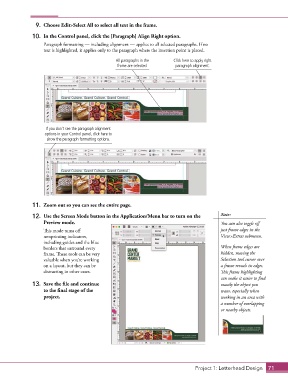
9.  Choose Edit>Select All to select all text in the frame.
               10.  In the Control panel, click the [Paragraph] Align Right option.

                   Paragraph formatting — including alignment — applies to all selected paragraphs. If no
                   text is highlighted, it applies only to the paragraph where the insertion point is placed.

                                                 All paragraphs in the   Click here to apply right
                                                 frame are selected.     paragraph alignment.


                    If you don’t see the paragraph alignment
                   options in your Control panel, click here to
                    show the paragraph formatting options.


               11.  Zoom out so you can see the entire page.

               12.  Use the Screen Mode button in the Application/Menu bar to turn on the   Note:
                   Preview mode.                                                            You can also toggle off

                   This mode turns off                                                      just frame edges in the
                   nonprinting indicators,                                                  View>Extras submenu.
                   including guides and the blue
                   borders that surround every                                              When frame edges are
                   frame. These tools can be very                                           hidden, moving the
                   valuable when you’re working                                             Selection tool cursor over
                   on a layout, but they can be                                             a frame reveals its edges.
                   distracting in other cases.                                              This frame highlighting
                                                                                            can make it easier to find
               13.  Save the file and continue                                              exactly the object you
                   to the final stage of the                                                want, especially when
                   project.                                                                 working in an area with
                                                                                            a number of overlapping
                                                                                            or nearby objects.


                                                                                  Project 1: Letterhead Design  71

