


Page 22 - CS6_AI_Look_Inside.pdf
P. 22
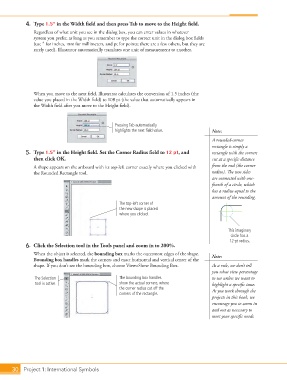
4.  Type 1.5” in the Width field and then press Tab to move to the Height field.
                    Regardless of what unit you see in the dialog box, you can enter values in whatever
                    system you prefer, as long as you remember to type the correct unit in the dialog box fields
                    (use 3 for inches, mm for millimeters, and pt for points; there are a few others, but they are
                    rarely used). Illustrator automatically translates one unit of measurement to another.


                    When you move to the next field, Illustrator calculates the conversion of 1.5 inches (the
                    value you placed in the Width field) to 108 pt (the value that automatically appears in
                    the Width field after you move to the Height field).


                                                      Pressing Tab automatically
                                                      highlights the next field value.       Note:
                                                                                             A rounded-corner
                                                                                             rectangle is simply a
                 5.  Type 1.5” in the Height field. Set the Corner Radius field to 12 pt, and    rectangle with the corners
                    then click OK.                                                           cut at a specific distance
                    A shape appears on the artboard with its top-left corner exactly where you clicked with   from the end (the corner
                    the Rounded Rectangle tool.                                              radius). The two sides
                                                                                             are connected with one-
                                                                                             fourth of a circle, which
                                                                                             has a radius equal to the
                                                                                             amount of the rounding.
                                                       The top-left corner of
                                                       the new shape is placed
                                                       where you clicked.


                                                                                                    This imaginary
                                                                                                     circle has a
                                                                                                    12-pt radius.
                 6.  Click the Selection tool in the Tools panel and zoom in to 200%.

                    When the object is selected, the bounding box marks the outermost edges of the shape.   Note:
                    Bounding box handles mark the corners and exact horizontal and vertical center of the
                    shape. If you don’t see the bounding box, choose View>Show Bounding Box.  As a rule, we don’t tell
                                                                                             you what view percentage
                     The Selection                     The bounding box handles              to use unless we want to
                     tool is active.                   show the actual corners, where        highlight a specific issue.
                                                       the corner radius cut off the         As you work through the
                                                       corners of the rectangle.
                                                                                             projects in this book, we
                                                                                             encourage you to zoom in
                                                                                             and out as necessary to
                                                                                             meet your specific needs.


           30 Project 1: International Symbols

