


Page 69 - CC2018_AI_Look_Inside
P. 69
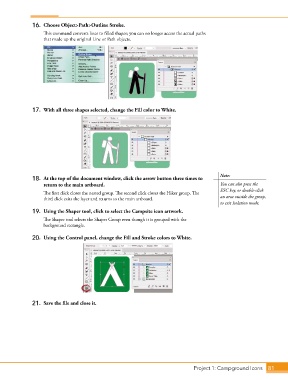
16.  Choose Object>Path>Outline Stroke.
                   This command converts lines to filled shapes; you can no longer access the actual paths
                   that made up the original Line or Path objects.


               17.  With all three shapes selected, change the Fill color to White.


                                                                                            Note:
               18.  At the top of the document window, click the arrow button three times to
                   return to the main artboard.                                             You can also press the
                                                                                            ESC key, or double-click
                   The first click closes the nested group. The second click closes the Hiker group. The
                   third click exits the layer and returns to the main artboard.            an area outside the group,
                                                                                            to exit Isolation mode.
               19.  Using the Shaper tool, click to select the Campsite icon artwork.
                   The Shaper tool selects the Shaper Group even though it is grouped with the
                   background rectangle.

               20.  Using the Control panel, change the Fill and Stroke colors to White.


               21.  Save the file and close it.


                                                                                 Project 1: Campground Icons    81

