


Page 32 - CC2017_AI_Look_Inside
P. 32
Align And distribute objeCts
          In addition to dragging objects around the artboard, the Illustrator Align panel makes
          it very easy to align and distribute selected objects relative to one another, to a specific
          key object in the file, or to the overall artboard. In this exercise, you learn how to use
          the Align panel to align shapes.
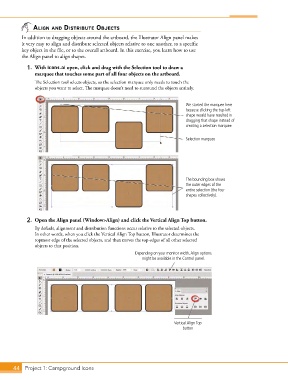
            1.  With icons.ai open, click and drag with the Selection tool to draw a
               marquee that touches some part of all four objects on the artboard.
               The Selection tool selects objects, so the selection marquee only needs to touch the
               objects you want to select. The marquee doesn’t need to surround the objects entirely.


                                                                              We started the marquee here
                                                                              because clicking the top-left
                                                                              shape would have resulted in
                                                                              dragging that shape instead of
                                                                              creating a selection marquee.

                                                                              Selection marquee


                                                                              The bounding box shows
                                                                              the outer edges of the
                                                                              entire selection (the four
                                                                              shapes collectively).


            2.  Open the Align panel (Window>Align) and click the Vertical Align Top button.
               By default, alignment and distribution functions occur relative to the selected objects.
               In other words, when you click the Vertical Align Top button, Illustrator determines the
               topmost edge of the selected objects, and then moves the top edges of all other selected
               objects to that position.
                                                         Depending on your monitor width, Align options
                                                            might be available in the Control panel.


                                                                         Vertical Align Top
                                                                            button


       44 Project 1: Campground Icons

