


Page 37 - CC2018_DW_Look_Inside
P. 37
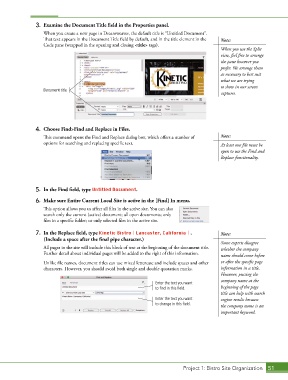
3.  Examine the Document Title field in the Properties panel.
                   When you create a new page in Dreamweaver, the default title is “Untitled Document”.
                   That text appears in the Document Title field by default, and in the title element in the   Note:
                   Code pane (wrapped in the opening and closing <title> tags).
                                                                                            When you use the Split
                                                                                            view, feel free to arrange
                                                                                            the pane however you
                                                                                            prefer. We arrange them
                                                                                            as necessary to best suit
                                                                                            what we are trying
                                                                                            to show in our screen
                   Document title
                                                                                            captures.


                4.  Choose Find>Find and Replace in Files.

                   This command opens the Find and Replace dialog box, which offers a number of   Note:
                   options for searching and replacing specific text.                       At least one file must be
                                                                                            open to use the Find and
                                                                                            Replace functionality.


                5.  In the Find field, type Untitled Document.

                6.  Make sure Entire Current Local Site is active in the [Find] In menu.
                   This option allows you to affect all files in the active site. You can also
                   search only the current (active) document; all open documents; only
                   files in a specific folder; or only selected files in the active site.

                7.  In the Replace field, type Kinetic Bistro | Lancaster, California | .   Note:
                   (Include a space after the final pipe character.)
                                                                                            Some experts disagree
                   All pages in the site will include this block of text at the beginning of the document title.   whether the company
                   Further detail about individual pages will be added to the right of this information.  name should come before

                   Unlike file names, document titles can use mixed lettercase and include spaces and other   or after the specific page
                   characters. However, you should avoid both single and double quotation marks.  information in a title.
                                                                                            However, putting the
                                                                                            company name at the
                                                                 Enter the text you want
                                                                 to find in this field.     beginning of the page
                                                                                            title can help with search
                                                                 Enter the text you want    engine results because
                                                                 to change in this field.   the company name is an
                                                                                            important keyword.


                                                                             Project 1: Bistro Site Organization  51

