


Page 40 - CC2017_DW_Look_Inside
P. 40
11.  Click the Close button in the Find/Replace function to close it.
           12.  Click in the Code pane to make it active.

               Making a specific pane active is called “bringing it into focus”.

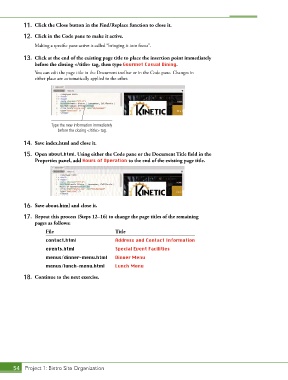
           13.  Click at the end of the existing page title to place the insertion point immediately
               before the closing </title> tag, then type Gourmet Casual Dining.
               You can edit the page title in the Document toolbar or in the Code pane. Changes in
               either place are automatically applied to the other.


                      Type the new information immediately
                         before the closing </title> tag.

           14.  Save index.html and close it.

           15.  Open about.html. Using either the Code pane or the Document Title field in the
               Properties panel, add Hours of Operation to the end of the existing page title.


           16.  Save about.html and close it.

           17.  Repeat this process (Steps 12–16) to change the page titles of the remaining
               pages as follows:
                    File                         Title
                    contact.html                 Address and Contact Information
                    events.html                  Special Event Facilities

                    menus/dinner-menu.html       Dinner Menu
                    menus/lunch-menu.html        Lunch Menu
           18.  Continue to the next exercise.


       54 Project 1: Bistro Site Organization

