


Page 19 - CS6_WD_Look_Inside
P. 19
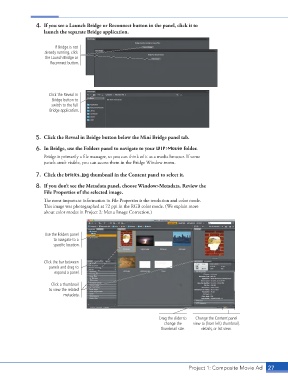
4.  If you see a Launch Bridge or Reconnect button in the panel, click it to
                        launch the separate Bridge application.


                            If Bridge is not
                        already running, click
                        the Launch Bridge or
                          Reconnect button.


                          Click the Reveal in
                           Bridge button to
                           switch to the full
                          Bridge application.


                    5.  Click the Reveal in Bridge button below the Mini Bridge panel tab.
                    6.  In Bridge, use the Folders panel to navigate to your WIP>Movie folder.
                        Bridge is primarily a file manager, so you can think of it as a media browser. If some
                        panels aren’t visible, you can access them in the Bridge Window menu.

                    7.  Click the bricks.jpg thumbnail in the Content panel to select it.

                    8.  If you don’t see the Metadata panel, choose Window>Metadata. Review the
                        File Properties of the selected image.
                        The most important information in File Properties is the resolution and color mode.
                        This image was photographed at 72 ppi in the RGB color mode. (We explain more
                        about color modes in Project 2: Menu Image Correction.)


                        Use the Folders panel
                            to navigate to a
                            specific location.


                        Click the bar between
                          panels and drag to
                            expand a panel.


                           Click a thumbnail
                          to view the related
                                metadata.


                                                                       Drag the slider to   Change the Content panel
                                                                         change the   view to (from left) thumbnail,
                                                                        thumbnail size.  details, or list view.


                                                                                    Project 1: Composite Movie Ad   27

