


Page 79 - Web Combo 2022
P. 79
6.  In the Save As/File Name field, delete the word “copy” from the default
                 file name (including the space before the word). Leave the extension in the
                 file name.
                 Because you used the Save a Copy menu command, the default file name automati-
                 cally includes the word “copy” to prevent accidentally overwriting the original file.

              7.  Leave the remaining options at their default values and click Save.
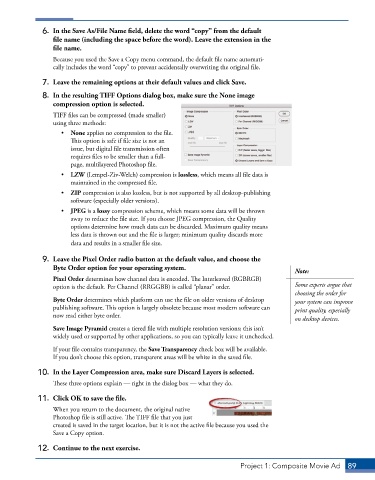
              8.  In the resulting TIFF Options dialog box, make sure the None image
                 compression option is selected.
                 TIFF files can be compressed (made smaller)
                 using three methods:
                    •  None applies no compression to the file.
                       This option is safe if file size is not an
                       issue, but digital file transmission often
                       requires files to be smaller than a full-
                       page, multilayered Photoshop file.
                    •  LZW (Lempel-Ziv-Welch) compression is lossless, which means all file data is
                       maintained in the compressed file.
                    •  ZIP compression is also lossless, but is not supported by all desktop-publishing
                       software (especially older versions).
                    •  JPEG is a lossy compression scheme, which means some data will be thrown
                       away to reduce the file size. If you choose JPEG compression, the Quality
                       options determine how much data can be discarded. Maximum quality means
                       less data is thrown out and the file is larger; minimum quality discards more
                       data and results in a smaller file size.
              9.  Leave the Pixel Order radio button at the default value, and choose the
                 Byte Order option for your operating system.
                                                                                           Note:
                 Pixel Order determines how channel data is encoded. The Interleaved (RGBRGB)
                 option is the default. Per Channel (RRGGBB) is called “planar” order.     Some experts argue that
                                                                                           choosing the order for
                 Byte Order determines which platform can use the file on older versions of desktop   your system can improve
                 publishing software. This option is largely obsolete because most modern software can   print quality, especially
                 now read either byte order.
                                                                                           on desktop devices.
                 Save Image Pyramid creates a tiered file with multiple resolution versions; this isn’t
                 widely used or supported by other applications, so you can typically leave it unchecked.

                 If your file contains transparency, the Save Transparency check box will be available.
                 If you don’t choose this option, transparent areas will be white in the saved file.

             10.  In the Layer Compression area, make sure Discard Layers is selected.
                 These three options explain — right in the dialog box — what they do.

             11.  Click OK to save the file.
                 When you return to the document, the original native
                 Photoshop file is still active. The TIFF file that you just
                 created is saved in the target location, but it is not the active file because you used the
                 Save a Copy option.
             12.  Continue to the next exercise.


                                                                          Project 1: Composite Movie Ad    89

