


Page 21 - CS6_GD_Look_Inside.pdf
P. 21
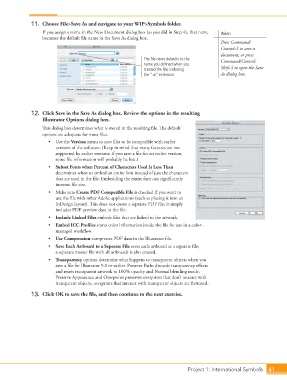
11.  Choose File>Save As and navigate to your WIP>Symbols folder.
                        If you assign a name in the New Document dialog box (as you did in Step 4), that name   Note:
                        becomes the default file name in the Save As dialog box.
                                                                                                 Press Command/
                                                                                                 Control-S to save a
                                                                                                 document, or press
                                                                 The file name defaults to the   Command/Control-
                                                                 name you defined when you
                                                                 created the file, including     Shift-S to open the Save
                                                                 the “.ai” extension.            As dialog box.


                   12.  Click Save in the Save As dialog box. Review the options in the resulting
                        Illustrator Options dialog box.
                        This dialog box determines what is stored in the resulting file. The default
                        options are adequate for most files.
                          •  Use the Version menu to save files to be compatible with earlier
                             versions of the software. (Keep in mind that many features are not
                             supported by earlier versions; if you save a file for an earlier version,
                             some file information will probably be lost.)
                          •  Subset Fonts when Percent of Characters Used Is Less Than
                             determines when to embed an entire font instead of just the characters
                             that are used in the file. Embedding the entire font can significantly
                             increase file size.
                          •  Make sure Create PDF Compatible File is checked if you want to
                             use the file with other Adobe applications (such as placing it into an
                             InDesign layout). This does not create a separate PDF file; it simply
                             includes PDF preview data in the file.
                          •  Include Linked Files embeds files that are linked to the artwork.
                          •  Embed ICC Profiles stores color information inside the file for use in a color-
                             managed workflow.
                          •  Use Compression compresses PDF data in the Illustrator file.
                          •  Save Each Artboard to a Separate File saves each artboard as a separate file;
                             a separate master file with all artboards is also created.
                          •  Transparency options determine what happens to transparent objects when you
                             save a file for Illustrator 9.0 or earlier. Preserve Paths discards transparency effects
                             and resets transparent artwork to 100% opacity and Normal blending mode.
                             Preserve Appearance and Overprints preserves overprints that don’t interact with
                             transparent objects; overprints that interact with transparent objects are flattened.

                   13.  Click OK to save the file, and then continue to the next exercise.


                                                                                   Project 1: International Symbols  41

