


Page 20 - CS6_GD_Look_Inside.pdf
P. 20
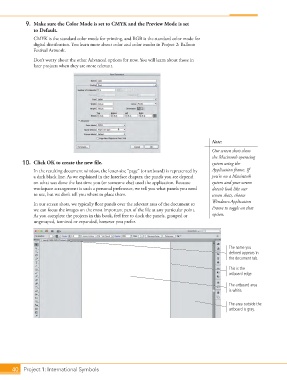
9.  Make sure the Color Mode is set to CMYK and the Preview Mode is set
                    to Default.
                    CMYK is the standard color mode for printing, and RGB is the standard color mode for
                    digital distribution. You learn more about color and color modes in Project 2: Balloon
                    Festival Artwork.
                    Don’t worry about the other Advanced options for now. You will learn about those in
                    later projects when they are more relevant.


                                                                                             Note:
                                                                                             Our screen shots show
                                                                                             the Macintosh operating
                10.  Click OK to create the new file.                                        system using the
                    In the resulting document window, the letter-size “page” (or artboard) is represented by   Application frame. If
                    a dark black line. As we explained in the Interface chapter, the panels you see depend   you’re on a Macintosh
                    on what was done the last time you (or someone else) used the application. Because   system and your screen
                    workspace arrangement is such a personal preference, we tell you what panels you need   doesn’t look like our
                    to use, but we don’t tell you where to place them.                       screen shots, choose
                                                                                             Window>Application
                    In our screen shots, we typically float panels over the relevant area of the document so
                    we can focus the images on the most important part of the file at any particular point.   Frame to toggle on that
                    As you complete the projects in this book, feel free to dock the panels, grouped or   option.
                    ungrouped, iconized or expanded, however you prefer.


                                                                                                    The name you
                                                                                                    defined appears in
                                                                                                    the document tab.
                                                                                                    This is the
                                                                                                    artboard edge.

                                                                                                    The artboard area
                                                                                                    is white.

                                                                                                    The area outside the
                                                                                                    artboard is gray.


           40 Project 1: International Symbols

