


Page 69 - CS6_PS_Look_Inside
P. 69
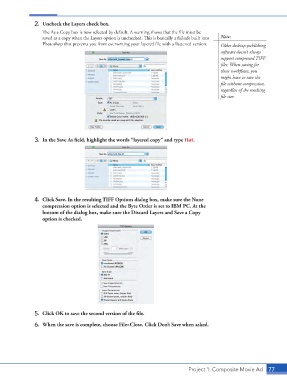
2.  Uncheck the Layers check box.
                        The As a Copy box is now selected by default. A warning shows that the file must be
                        saved as a copy when the Layers option is unchecked. This is basically a failsafe built into   Note:
                        Photoshop that prevents you from overwriting your layered file with a flattened version.  Older desktop-publishing
                                                                                                 software doesn’t always
                                                                                                 support compressed TIFF
                                                                                                 files. When saving for
                                                                                                 those workflows, you
                                                                                                 might have to save the
                                                                                                 file without compression,
                                                                                                 regardless of the resulting
                                                                                                 file size.


                    3.  In the Save As field, highlight the words “layered copy” and type flat.


                    4.  Click Save. In the resulting TIFF Options dialog box, make sure the None
                        compression option is selected and the Byte Order is set to IBM PC. At the
                        bottom of the dialog box, make sure the Discard Layers and Save a Copy
                        option is checked.


                    5.  Click OK to save the second version of the file.

                    6.  When the save is complete, choose File>Close. Click Don’t Save when asked.


                                                                                    Project 1: Composite Movie Ad   77

