


Page 20 - CS6_PS_Look_Inside
P. 20
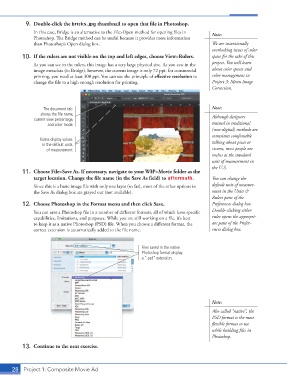
9.  Double-click the bricks.jpg thumbnail to open that file in Photoshop.
                    In this case, Bridge is an alternative to the File>Open method for opening files in   Note:
                    Photoshop. The Bridge method can be useful because it provides more information
                    than Photoshop’s Open dialog box.                                        We are intentionally
                                                                                             overlooking issues of color
                10.  If the rulers are not visible on the top and left edges, choose View>Rulers.  space for the sake of this
                    As you can see in the rulers, this image has a very large physical size. As you saw in the   project. You will learn
                    image metadata (in Bridge), however, the current image is only 72 ppi; for commercial   about color spaces and
                    printing, you need at least 300 ppi. You can use the principle of effective resolution to   color management in
                    change the file to a high enough resolution for printing.                Project 3: Menu Image
                                                                                             Correction.


                        The document tab                                                     Note:
                       shows the file name,                                                  Although designers
                    current view percentage,
                          and color mode.                                                    trained in traditional
                                                                                             (non-digital) methods are
                                                                                             sometimes comfortable
                       Rulers display values                                                 talking about picas or
                        in the default units
                         of measurement.                                                     ciceros, most people use
                                                                                             inches as the standard
                                                                                             unit of measurement in
                                                                                             the U.S.
                11.  Choose File>Save As. If necessary, navigate to your WIP>Movie folder as the
                    target location. Change the file name (in the Save As field) to aftermath.  You can change the
                    Since this is a basic image file with only one layer (so far), most of the other options in   default unit of measure-
                    the Save As dialog box are grayed out (not available).                   ment in the Units &
                                                                                             Rulers pane of the
                12.  Choose Photoshop in the Format menu and then click Save.                Preferences dialog box.
                    You can save a Photoshop file in a number of different formats, all of which have specific   Double-clicking either
                    capabilities, limitations, and purposes. While you are still working on a file, it’s best   ruler opens the appropri-
                    to keep it as a native Photoshop (PSD) file. When you choose a different format, the   ate pane of the Prefer-
                    correct extension is automatically added to the file name.               ences dialog box.


                                                                Files saved in the native
                                                                Photoshop format display
                                                                a “.psd” extension.


                                                                                             Note:
                                                                                             Also called “native”, the
                                                                                             PSD format is the most
                                                                                             flexible format to use
                                                                                             while building files in
                                                                                             Photoshop.
                13.  Continue to the next exercise.


           28 Project 1: Composite Movie Ad

