


Page 74 - CC2017_PS_Look_Inside
P. 74
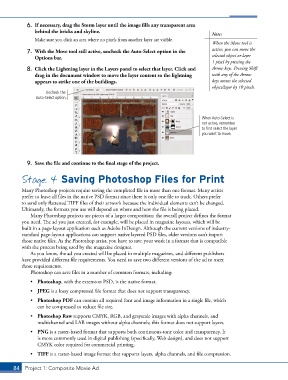
6.  If necessary, drag the Storm layer until the image fills any transparent area
               behind the bricks and skyline.
                                                                                        Note:
               Make sure you click an area where no pixels from another layer are visible.
                                                                                        When the Move tool is
            7.  With the Move tool still active, uncheck the Auto-Select option in the   active, you can move the
               Options bar.                                                             selected object or layer
                                                                                        1 pixel by pressing the
            8.  Click the Lightning layer in the Layers panel to select that layer. Click and   Arrow keys. Pressing Shift
               drag in the document window to move the layer content so the lightning   with any of the Arrow
               appears to strike one of the buildings.                                  keys moves the selected
                                                                                        object/layer by 10 pixels.
                    Uncheck the
                Auto-Select option.


                                                                                    When Auto-Select is
                                                                                    not active, remember
                                                                                    to first select the layer
                                                                                    you want to move.


            9.  Save the file and continue to the final stage of the project.

          Stage 4 Saving Photoshop Files for Print


          Many Photoshop projects require saving the completed file in more than one format. Many artists
          prefer to leave all files in the native PSD format since there is only one file to track. Others prefer
          to send only flattened TIFF files of their artwork because the individual elements can’t be changed.
          Ultimately, the formats you use will depend on where and how the file is being placed.
              Many Photoshop projects are pieces of a larger composition; the overall project defines the format
          you need. The ad you just created, for example, will be placed in magazine layouts, which will be
          built in a page-layout application such as Adobe InDesign. Although the current versions of industry-
          standard page-layout applications can support native layered PSD files, older versions can’t import
          those native files. As the Photoshop artist, you have to save your work in a format that is compatible
          with the process being used by the magazine designer.
              As you know, the ad you created will be placed in multiple magazines, and different publishers
          have provided different file requirements. You need to save two different versions of the ad to meet
          those requirements.
              Photoshop can save files in a number of common formats, including:

              •  Photoshop, with the extension PSD, is the native format.
              •  JPEG is a lossy compressed file format that does not support transparency.
              •  Photoshop PDF can contain all required font and image information in a single file, which
                can be compressed to reduce file size.
              •  Photoshop Raw supports CMYK, RGB, and grayscale images with alpha channels, and
                multichannel and LAB images without alpha channels; this format does not support layers.

              •  PNG is a raster-based format that supports both continuous-tone color and transparency. It
                is more commonly used in digital publishing (specifically, Web design), and does not support
                CMYK color required for commercial printing.
              •  TIFF is a raster-based image format that supports layers, alpha channels, and file compression.


       84 Project 1: Composite Movie Ad

