


Page 42 - Adobe Photoshop 2021
P. 42
12.  Click the arrow to the left of the Logotypes group
              name to expand the layer group.                                           Note:
               You have to expand the layer group to be able to access and
               edit individual layers in the group. If you select the entire            You can click the Eye
               layer group, you can move all layers within the group at                 icon for a layer folder
               the same time. Layers in the group maintain their position               to hide the entire layer
               relative to one another.                                                 group (and all layers
                                                                                        inside the folder).
          13.  Save the file and continue to the next exercise.


               Move and Transform a Smart Object Layer

         Photoshop makes scaling, rotating, and other transformations fairly easy
         to implement, but it is important to realize the potential impact of your
         transformations.

           1.  With cd-artwork.psd open, click the Title-text layer (in the Logotypes
               folder) in the Layers panel to select only that layer.

           2.  Choose the Move tool in the Tools panel.
               As the name suggests, the Move tool is used to move a selection around on the canvas.
               You can select a specific area, and then click and drag to move only the selection on
               the active layer. If there is no active selection area, you can click and drag to move the
               contents of the entire active layer.


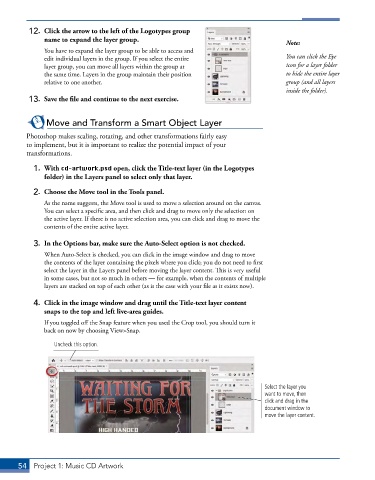
           3.  In the Options bar, make sure the Auto-Select option is not checked.
               When Auto-Select is checked, you can click in the image window and drag to move
               the contents of the layer containing the pixels where you click; you do not need to first
               select the layer in the Layers panel before moving the layer content. This is very useful
               in some cases, but not so much in others — for example, when the contents of multiple
               layers are stacked on top of each other (as is the case with your file as it exists now).

           4.  Click in the image window and drag until the Title-text layer content
              snaps to the top and left live-area guides.

               If you toggled off the Snap feature when you used the Crop tool, you should turn it
               back on now by choosing View>Snap.

                  Uncheck this option.


                                                                                  Select the layer you
                                                                                  want to move, then
                                                                                  click and drag in the
                                                                                  document window to
                                                                                  move the layer content.


       54  Project 1: Music CD Artwork

