


Page 37 - Adobe Photoshop CC 2020
P. 37
4.  Open the Window>Arrange menu and choose 2-up Vertical to show both
                 open files at one time.
                 As you saw in the Interface chapter, these options are useful for arranging and viewing
                 multiple open files within your workspace.


              5.  Choose the Move tool in the Tools panel.
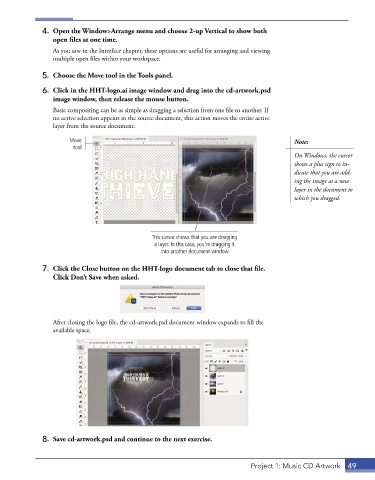
              6.  Click in the HHT-logo.ai image window and drag into the cd-artwork.psd
                 image window, then release the mouse button.
                 Basic compositing can be as simple as dragging a selection from one file to another. If
                 no active selection appears in the source document, this action moves the entire active
                 layer from the source document.

                      Move                                                                 Note:
                       tool
                                                                                           On Windows, the cursor
                                                                                           shows a plus sign to in-
                                                                                           dicate that you are add-
                                                                                           ing the image as a new
                                                                                           layer in the document to
                                                                                           which you dragged.


                                               This cursor shows that you are dragging
                                                a layer. In this case, you’re dragging it
                                                  into another document window.

              7.  Click the Close button on the HHT-logo document tab to close that file.
                 Click Don’t Save when asked.


                 After closing the logo file, the cd-artwork.psd document window expands to fill the
                 available space.


              8.  Save cd-artwork.psd and continue to the next exercise.


                                                                              Project 1: Music CD Artwork  49

