


Page 35 - Adobe Photoshop CC 2020
P. 35
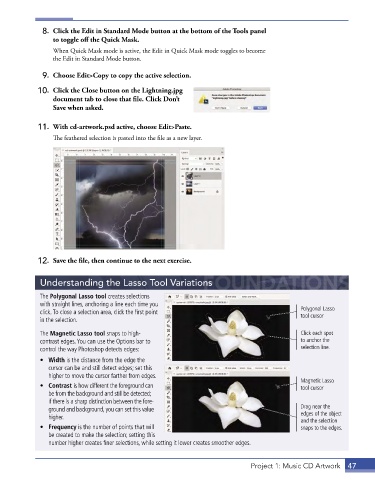
8.  Click the Edit in Standard Mode button at the bottom of the Tools panel
                 to toggle off the Quick Mask.
                 When Quick Mask mode is active, the Edit in Quick Mask mode toggles to become
                 the Edit in Standard Mode button.


              9.  Choose Edit>Copy to copy the active selection.
             10.  Click the Close button on the Lightning.jpg
                 document tab to close that file. Click Don’t
                 Save when asked.

             11.  With cd-artwork.psd active, choose Edit>Paste.

                 The feathered selection is pasted into the file as a new layer.


             12.  Save the file, then continue to the next exercise.


             Understanding the Lasso Tool Variations

             The Polygonal Lasso tool creates selections
             with straight lines, anchoring a line each time you
             click . To close a selection area, click the first point                        Polygonal Lasso
                                                                                             tool cursor
             in the selection .
             The Magnetic Lasso tool snaps to high-                                          Click each spot
             contrast edges . You can use the Options bar to                                 to anchor the
             control the way Photoshop detects edges:                                        selection line.
             •  Width is the distance from the edge the
                cursor can be and still detect edges; set this
                higher to move the cursor farther from edges .
                                                                                             Magnetic Lasso
             •  Contrast is how different the foreground can                                 tool cursor
                be from the background and still be detected;
                if there is a sharp distinction between the fore-
                ground and background, you can set this value                                Drag near the
                higher .                                                                     edges of the object
                                                                                             and the selection
             •  Frequency is the number of points that will                                  snaps to the edges.
                be created to make the selection; setting this
                number higher creates finer selections, while setting it lower creates smoother edges .


                                                                              Project 1: Music CD Artwork  47

