


Page 74 - CS6_ID_Look_Inside
P. 74
Project Summary


               We designed this project to introduce you to the basics of page layout with InDesign; you will
               expand on these skills throughout this book. Creating a new document to meet specifi c project
               needs — including page size, margins, and the printer’s stated bleed requirements — is one of the
               most important tasks you will complete in InDesign.
                  After the page structure is created, InDesign has many tools for creating objects — basic shapes,
               lines and Bézier curves, placeholder frames, and text frames. Th  e built-in drawing tools can create
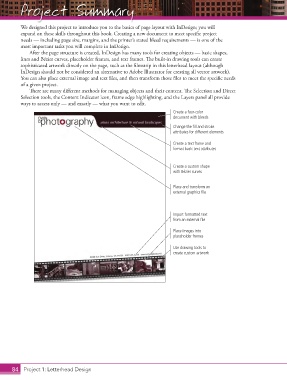
               sophisticated artwork directly on the page, such as the fi lmstrip in this letterhead layout (although
               InDesign should not be considered an alternative to Adobe Illustrator for creating all vector artwork).
               You can also place external image and text fi les, and then transform those fi les to meet the specifi c needs
               of a given project.
                  Th  ere are many diff erent methods for managing objects and their content. Th  e Selection and Direct
               Selection tools, the Content Indicator icon, frame edge highlighting, and the Layers panel all provide
               ways to access only — and exactly — what you want to edit.
                                                                             Create a four-color
                                                                             document with bleeds
                                                                             Change the fill and stroke
                                                                             attributes for different elements

                                                                             Create a text frame and
                                                                             format basic text attributes


                                                                             Create a custom shape
                                                                             with Bézier curves


                                                                             Place and transform an
                                                                             external graphics file


                                                                             Import formatted text
                                                                             from an external file

                                                                             Place images into
                                                                             placeholder frames

                                                                             Use drawing tools to
                                                                             create custom artwork


           84 Project 1: Letterhead Design

