


Page 43 - Adobe Indesign CC 2020
P. 43
Create a Rounded Rectangle
            In addition to basic rectangles, you can create frames with a number of special corner
            treatments. In this exercise, you modify one corner of the right-most graphics frame
            to smoothly blend with the curve of the underlying background shape.
              1.  With gcm-letterhead.indd open, make sure nothing is selected in the layout.

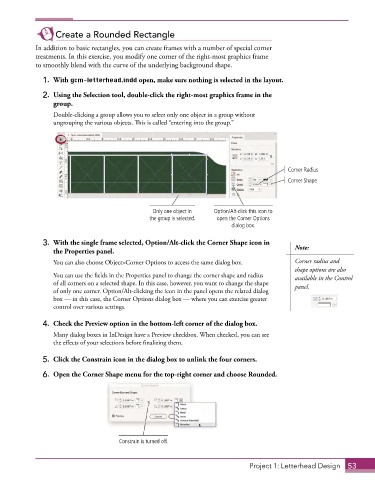
              2.  Using the Selection tool, double-click the right-most graphics frame in the
                 group.
                 Double-clicking a group allows you to select only one object in a group without
                 ungrouping the various objects. This is called “entering into the group.”


                                                                                         Corner Radius
                                                                                         Corner Shape


                                                Only one object in   Option/Alt-click this icon to
                                               the group is selected.  open the Corner Options
                                                                        dialog box.

              3.  With the single frame selected, Option/Alt-click the Corner Shape icon in   Note:
                 the Properties panel.
                 You can also choose Object>Corner Options to access the same dialog box.  Corner radius and
                                                                                           shape options are also
                 You can use the fields in the Properties panel to change the corner shape and radius   available in the Control
                 of all corners on a selected shape. In this case, however, you want to change the shape   panel.
                 of only one corner. Option/Alt-clicking the icon in the panel opens the related dialog
                 box — in this case, the Corner Options dialog box — where you can exercise greater
                 control over various settings.

              4.  Check the Preview option in the bottom-left corner of the dialog box.
                 Many dialog boxes in InDesign have a Preview checkbox. When checked, you can see
                 the effects of your selections before finalizing them.


              5.  Click the Constrain icon in the dialog box to unlink the four corners.
              6.  Open the Corner Shape menu for the top-right corner and choose Rounded.


                                     Constrain is turned off.


                                                                             Project 1: Letterhead Design  53

